


Bug voting is open, but I see no VOTE button

Bug voting is open. Your help file says "Click on the "(vote)" link that appears on the right of the "Importance" fields." I do not know what an importance field is. The word "importance" does not appear on the page. The word "vote" does not appear either. THE INSTRUCTIONS ON THIS LINK ARE NOT FOR REGULAR USERS: https://bugzilla.mozilla.org/page.cgi?id=voting.html
Where is the vote button??? Here is the page where I want to vote: https://bugzilla.mozilla.org/show_bug.cgi?id=1581664
As a beginner, I see nothing at the end of this page to be notified if responded. If I dont' get notified, I probably wont be able to find my way back here. Why so difficult for non-power users?!?
Wszystkie odpowiedzi (10)
Wybrane rozwiązanie
Hi ChrisG, your default notification setting applies to new questions and replies. You can check those here:
https://support.mozilla.org/users/settings
To find your past posts, you can use the links in your profile -- hover your username in the upper right corner to access that from the menu. (Note: works on Win/Mac/Linux, but not on mobile.)
To subscribe to any thread, to the right of the question, expand the Question Tools section and click "Get email updates".
On Bugzilla, the vote count and Vote button are in now the Details section (see the attached screenshot). You need to be logged in to vote.
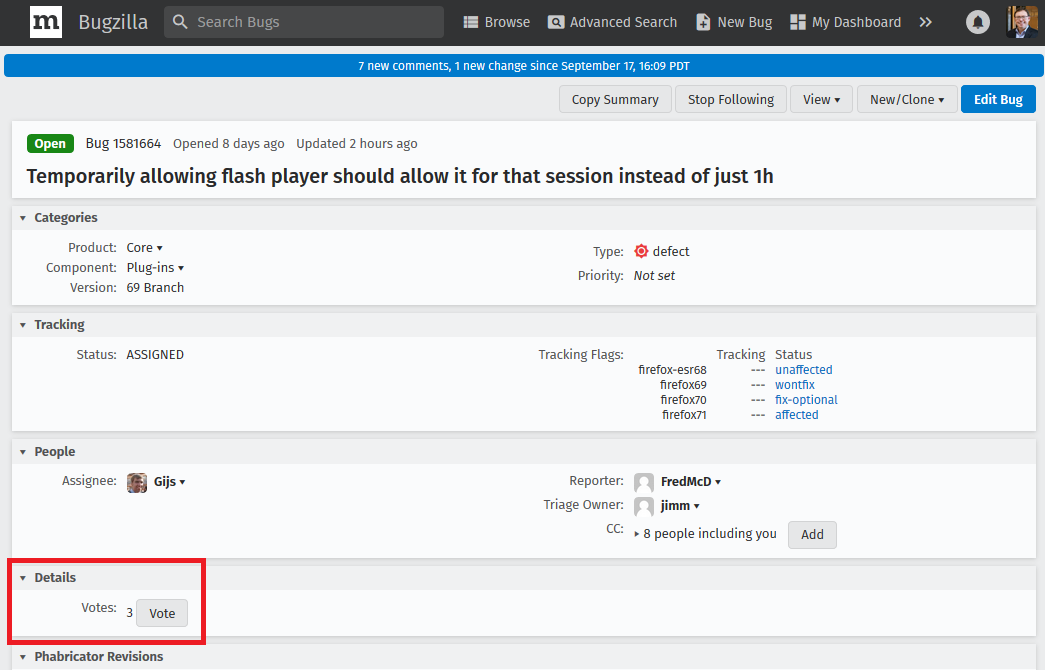
Zmodyfikowany przez jscher2000 - Support Volunteer w dniu
Thank you! The Details tab was not automatically expanded, which I think it should be, and the Moz needs to keep up with their own changes!
Maybe you should file a new bug to get that page updated? ;-)
Note that the bug is WONTFIX for Firefox 69 and FIX-OPTIONAL for Firefox 70.
As posted in another thread, you can extend the default expiration time from 60 minutes (one hour) to 1440 minutes (one day) in Firefox 69 by modifying a pref on the about:config page.
- plugin.sessionPermissionNow.intervalInMinutes => 1440 (default = 60)
The page I use Flash on does not expire after an hour. Its been going for 4+hours now It is the weather.gov local radar loop from the NWS. I confirmed my system set for 60 minutes expire. Using V69.0.1 .
I've had yourMountain View, CA base reflectivity loop running for 2+ hours: https://radar.weather.gov/radar.php?rid=MUX&product=N0R&overlay=11101111&loop=yes
It's not expiring. However, when I opened another tab to visit Mountain View radar, I had to again click to activate Flash, then again to allow it, even while another tab is running flash on the same weather.gov server.
Zmodyfikowany przez ChrisG w dniu
As long as you are on the same tab and Flash is running then it should continue to run. I think that if you would refresh the tab or open a new tab after the permission has expires that you will have to allow the plugin once again.
Did you try to increase the value of the above mentioned pref on the about:config page?
- plugin.sessionPermissionNow.intervalInMinutes
No. As long as it runs, I don't seem to need so. But yes, if I refresh the tab, I have to do it again. The page has an auto update feature, and also a within map refresh button which does not affect the permission.
The local NWS webserver replied to my question, and he says NWS is planning to replace Flash but does not know the time table.
ChrisG said
Thank you! The Details tab was not automatically expanded, which I think it should be, and the Moz needs to keep up with their own changes!
Hi weird1, did you have a follow-up question about voting on Bugzilla, or about notifications?