


Windows 10 reached EOS (end of support) on October 14, 2025. If you are on Windows 10, see this article.

Przeszukaj pomoc

Unikaj oszustw związanych z pomocą.Nigdy nie będziemy prosić Cię o dzwonienie na numer telefonu, wysyłanie SMS-ów ani o udostępnianie danych osobowych. Zgłoś podejrzaną aktywność, korzystając z opcji „Zgłoś nadużycie”.

Więcej informacji
Wątek został zarchiwizowany. Jeśli potrzebujesz pomocy, zadaj nowe pytanie.
Zarchiwizowany

Cannot receive messages but send is OK.

SteveAust

Thunderbird working fine then suddenly went to check email and a "Add security exception" box appeared (see image). Tried "Confirm Security Exception" but no response - although this worked if I unchecked "Permenantly Store this exception" - but following this I could not connect to server (timed out). I thought the problem may be my AVG anti virus so I turned off the email protection. Started Thunderbird again and this time no "Add Security Exception" box but still will not connect to server. One of the advice sections said to check passwords in Tools/Settings/Security but all passwords had disappeared. Sending mail no problem and all account settings correct.

Thunderbird working fine then suddenly went to check email and a "Add security exception" box appeared (see image). Tried "Confirm Security Exception" but no response - although this worked if I unchecked "Permenantly Store this exception" - but following this I could not connect to server (timed out). I thought the problem may be my AVG anti virus so I turned off the email protection. Started Thunderbird again and this time no "Add Security Exception" box but still will not connect to server. One of the advice sections said to check passwords in Tools/Settings/Security but all passwords had disappeared. Sending mail no problem and all account settings correct.

Wszystkie odpowiedzi (2)

Sorry - here is image
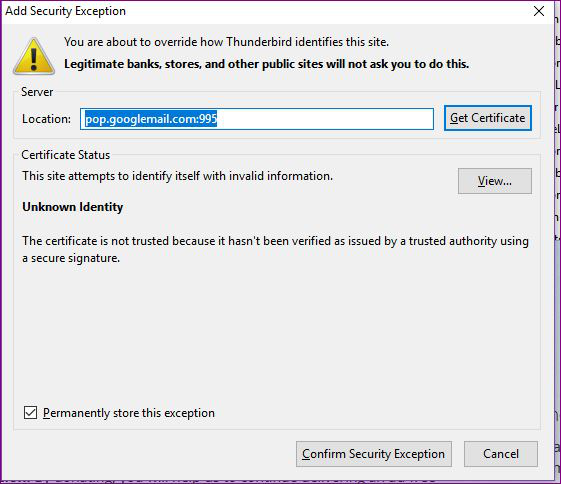
what does the "view" show? my guess is it will be your anti virus product listed as the issuer instead of a real trusted authority.