


Error code: SEC_ERROR_OCSP_INVALID_SIGNING_CERT >> Whats going on i cannot access Outlook Hotmail & are not receiving E-mails from Firefox to verify my account

I cannot access Outlook Hotmail via firefox ? { Error code: SEC_ERROR_OCSP_INVALID_SIGNING_CERT } started 28/5/17 . Also am Not receiving Mozilla Firefox Verification E-Mails in my hotmail address . Have checked Spam and inbox nothing happening ?
Wybrane rozwiązanie
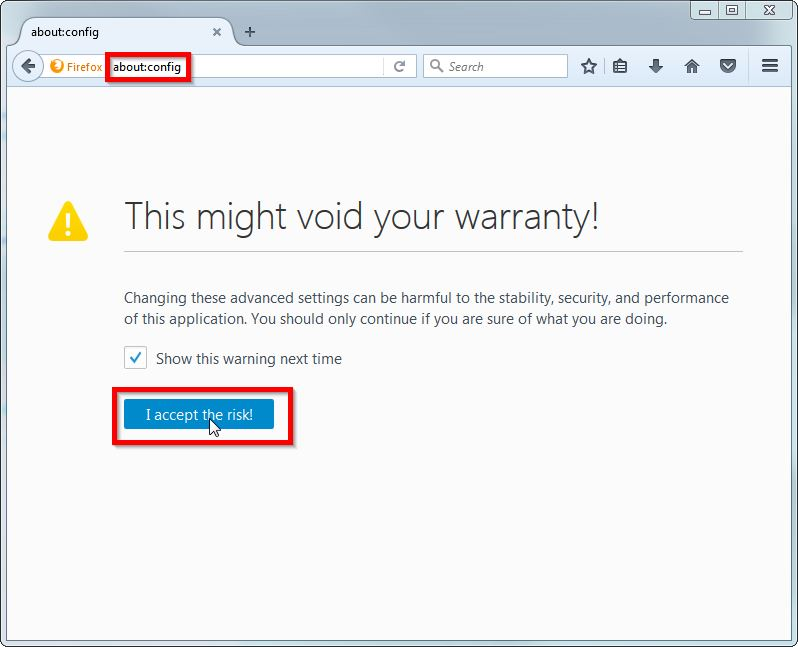
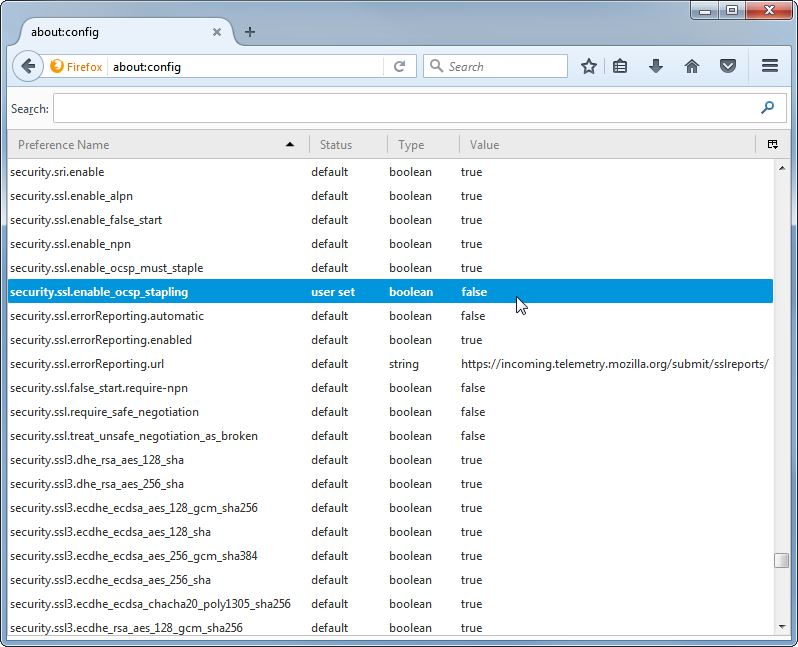
hey, it's about:config with a colon (see screenshots).
Wszystkie odpowiedzi (4)
hi, unfortunately MS has misconfigured a security feature (OCSP stapling) on their servers which got now cached in your local firefox installation.
in order to resolve that, please enter about:config into the firefox address bar (confirm the info message in case it shows up) & search for the preference named security.ssl.enable_ocsp_stapling. double-click it and change its value to false - this will degrade a security feature in firefox, so please revisit it in a couple of days again after microsoft has fixed their stuff and turn it back on again then...
When I enter About.config into address bar there are no preference settings showing . Ie do I have another way to get to security.ssl.enable_ocsp_stapling. Step by step would be good .
Wybrane rozwiązanie
hey, it's about:config with a colon (see screenshots).
Thank you that fixed it .