Wątek został zarchiwizowany.
Jeśli potrzebujesz pomocy, zadaj nowe pytanie.

Zarchiwizowany
How can I have a start page without frequently visited sites displayed?

I often use my iPad in a university classroom setting to lookup information on the fly. I do not want my list of frequently visited sites visible but would like to have a curated list of search engines as a 'start page'. When I ask for a new page with a '+' , I want to see only this neutral search page only.
I often use my iPad in a university classroom setting to lookup information on the fly.
I do not want my list of frequently visited sites visible but would like to have a curated list of search engines as a 'start page'.
When I ask for a new page with a '+' , I want to see only this neutral search page only.
Wszystkie odpowiedzi (1)

These instructions are for iphone, but I assume they work on the ipad.
- Tap the menu button in the bottom-centre,
- In the menu, swipe to the left until you see the Settings icon, then tap on Settings.
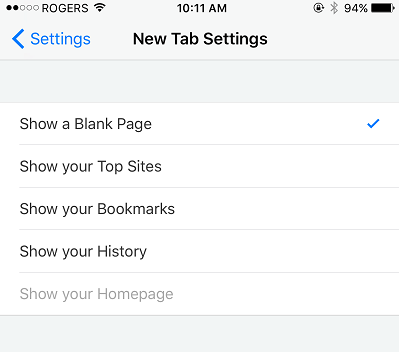
- Open the New Tab panel.
- Tap on Show a blank page.
If you set a homepage, you can also set new tabs to open your homepage. For instructions on setting the homepage, see Set a homepage in Firefox for iOS.