

Wątek został zarchiwizowany.
Jeśli potrzebujesz pomocy, zadaj nowe pytanie.

Zarchiwizowany
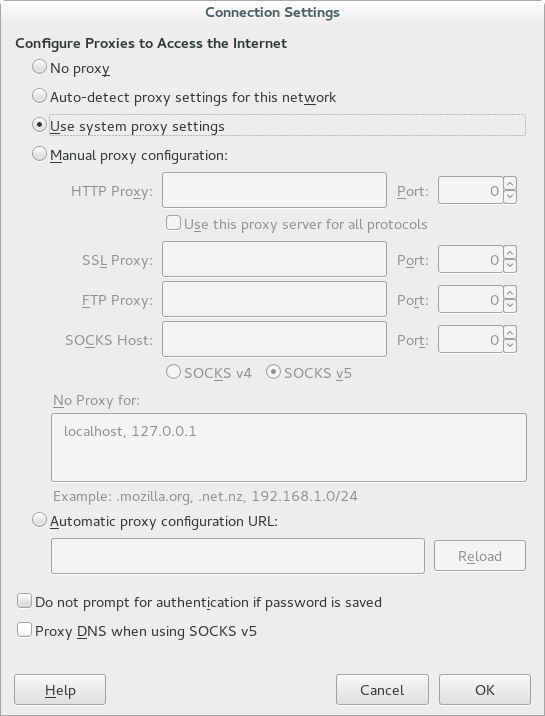
I can't find the Remote DNS options in the proxy settings (it is usually next to the SOCKS v5 option).

I am running Firefox version 50.0.2. I can't find the Remote DNS options in the proxy settings (it is usally next to the SOCKS v5 option). In the option's place is a blank space
I am running Firefox version 50.0.2. I can't find the Remote DNS options in the proxy settings (it is usally next to the SOCKS v5 option). In the option's place is a blank space

Zmodyfikowany przez greg5678 w dniu
Wszystkie odpowiedzi (1)
The "Remote DNS" checkbox has been moved to the bottom of the Connection Settings window and is renamed to "Proxy DNS when using SOCKS v5".
- bug 1249494 - Move networkProxySOCKSRemoteDNS checkbox to clarify when it can be set
Please do not comment in bug reports
https://bugzilla.mozilla.org/page.cgi?id=etiquette.html
<checkbox id="networkProxySOCKSRemoteDNS"  preference="network.proxy.socks_remote_dns" label="&socksRemoteDNS.label2;" accesskey="&socksRemoteDNS.accesskey;" />

<!ENTITY  socksRemoteDNS.label2         "Proxy DNS when using SOCKS v5">
Zmodyfikowany przez cor-el w dniu