


Hi. When I write email messages after sending them, they look like html code for website creating, etc.

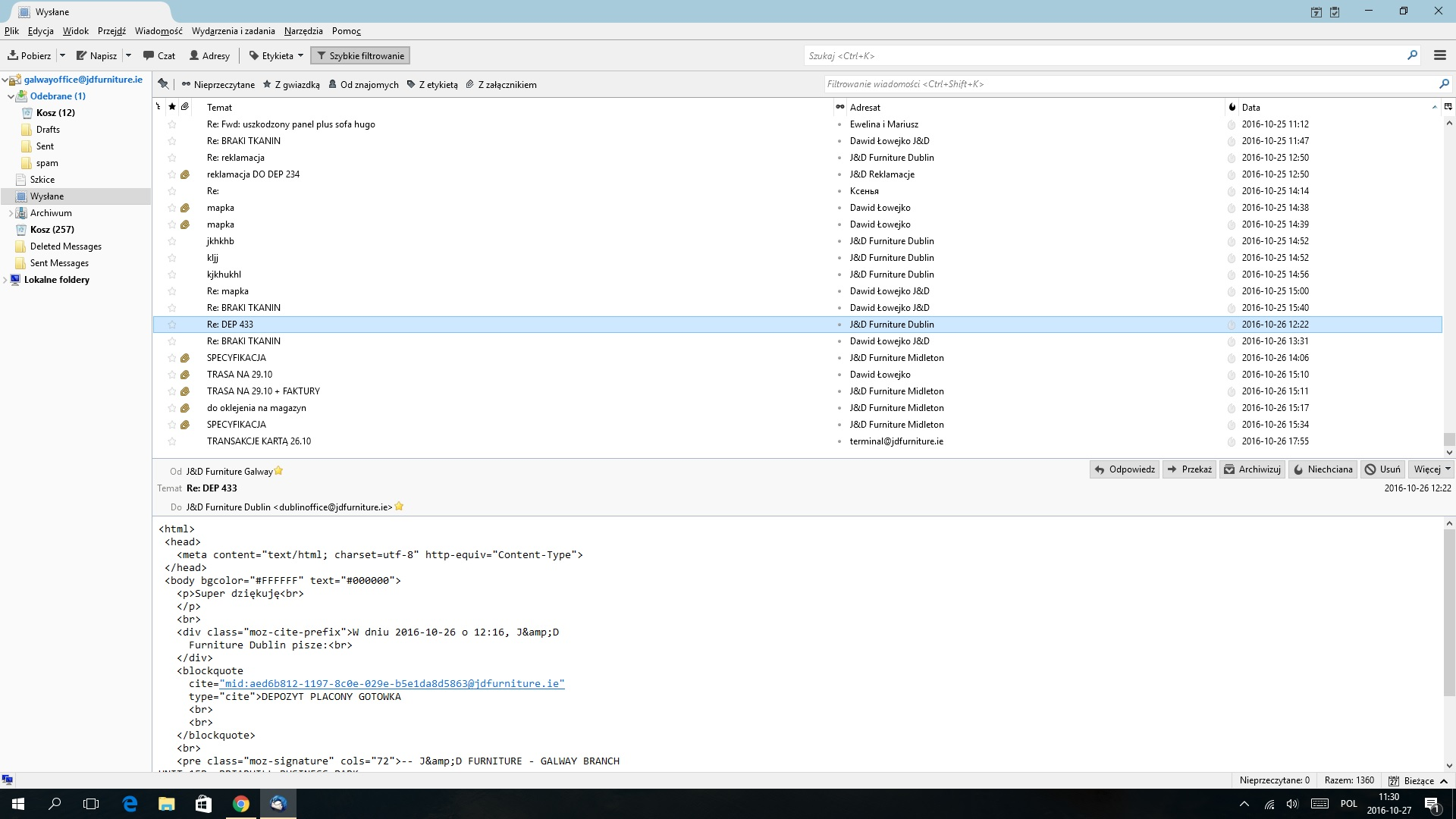
As described above when I send emails they look like html code for creating the website. It happens only when they are sent to other company members. I attach a printscreen of email message sent yesterday.
Wszystkie odpowiedzi (1)
Wybrane rozwiązanie
Odd....sounds like you are composing in html but not actually sending as html, only plain text. Please check the source. select the email so it shows in Message Pane click on 'More' button and select 'View Source' The line: <meta content="text/html; charset=utf-8" http-equiv="Content-Type" > will be within the <head> section. Above it you should see something like this:
- MIME-Version: 1.0
- Content-Type: text/html; charset="utf-8"
- Content-Transfer-Encoding: 7bit
Confirm what you see.
What settings do you have for sending? 'Menu icon' > 'Options' > 'Options' > Composition' > 'General' tab click on 'Send Options' button from the drop down select 'Send the message in both plain text and HTML' click on OK click on OK
Confirm what setting you had and whether you needed to change it.
If you changed the 'Send Options' as advised, please restart Thunderbird and test sending an email. Please report back on results.