


FF for Mac Desktop, V160 Icons in bookmarks toolbar too crammed together now. How to spread them out without doing for each single one?

With V160 in FF for Mac Desktop, the toolbar icons are too close together now. Can I get them back to the spacing they were at, globally, or do I need to insert space for each of the 35 icons?
All Replies (7)
Hey Chris, I haven't noticed any change in that regard recently — could you please attach a screenshot where exactly you're facing the issue? How do I create a screenshot of my problem? — Thanks!
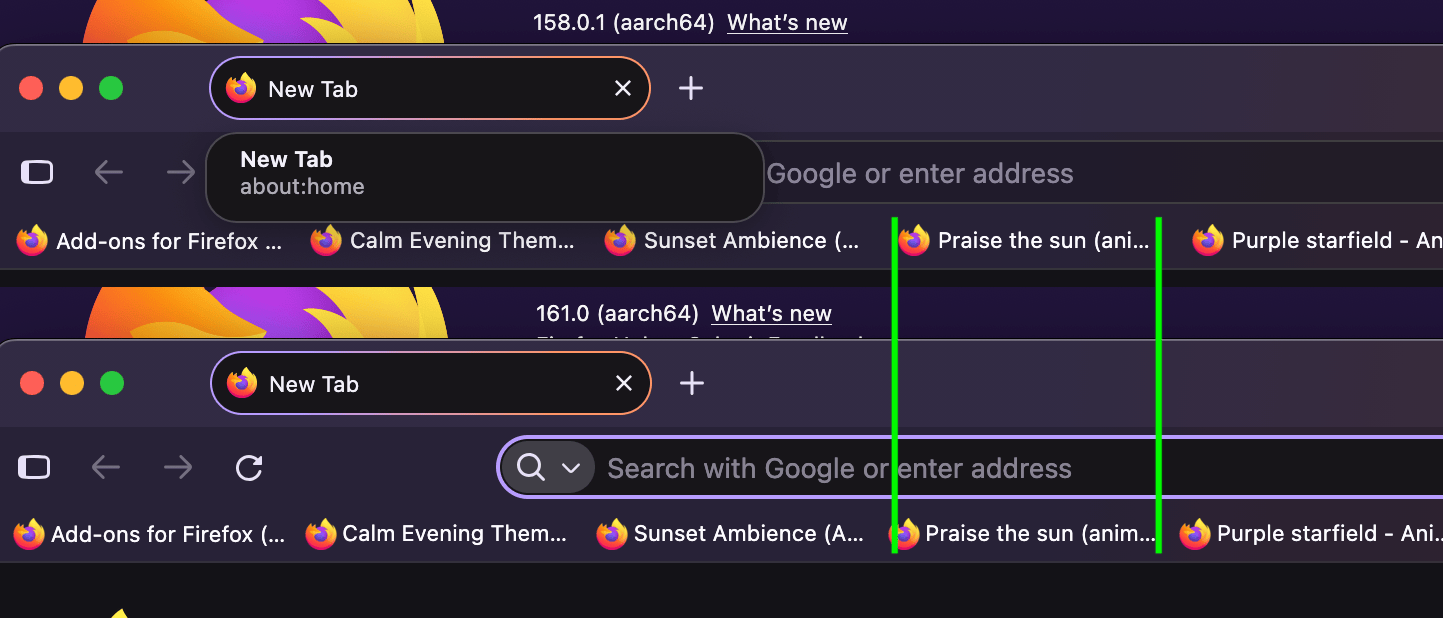
Before the update, the bookmarks filled the horizontal space and had more space between each one. Now they are all crammed together, with extra space on the right end.
When I asked Google about V160 bookmarks toolbar, it said:
"A recent Firefox update intentionally reduced horizontal padding on the bookmarks toolbar, which is why your bookmarks suddenly appear crammed together. Users on Reddit noted that this change tightens the spacing to fit more bookmarks on the bar before triggering the overflow menu."
It offered a complicated fix, which is why I asked if there is a simple fix.
Ah, bookmark items. Interesting. It indeed appears there's some change to either show more of the text, or fit more items in there:
I was about to suggest trying out "touch" density in Settings › Appearance but from a quick glance that seems to only affect the vertical spacing, not horizontal. Sorry. (The various reddit FirefoxCSS tweaks might be the only working option at the moment.)
I figured as much. My suggestion would be an option to 'fill to existing space' IF they don't take up the entire line, or 'use more spacing and add overflow menu' option.
I'm getting use to it, but it does take another moment for these 74 year old eyes to pick out the one I want and to be more careful with the mouse in selecting it.
I see you're also bumping up the zoom for page content and in general you have quite a lot of screen real estate to potentially make the whole UI a bit bigger as a whole… there's an ugly internal setting, that, well, might break things, but might be worth experimenting with: support.mozilla.org/questions/1601155 (for Retina screens a value of say 2.5 might make some difference…)
Thank you jbr. I'm not a power user and don't feel comfortable following the instructions in the link you provided. If I must, Google says I can add space between each of my 35 toolbar bookmarks, one by one. I was hoping there was an easier way to do this. My zoom is high because I'm old and can't/don't like to read tiny type.
[Editorial Alert] Sometimes, I wonder if the 'kids' doing development really understand that there are old people who use their products.