


Windows 10 reached EOS (end of support) on October 14, 2025. If you are on Windows 10, see this article.

Search Support

Avoid support scams. We will never ask you to call or text a phone number or share personal information. Please report suspicious activity using the “Report Abuse” option.

Learn More
Open

Thunderbird e-mails receive OK, but won't send

adtypeanddesign

I have used Thunderbird on a MacBook Pro Max M4 for a while now. It worked fine until starting last Monday. Ever since then, I have to go to 1&1/IONOS e-mail on the web to send e-mails or use my iPhone and blind copy myself. It’s a pain going back and forth.

1&1/IONOS tech support helped me make sure all settings for the outgoing server (smtp) were and are correct. Tests on both incoming and outgoing ports are successful in the Thunderbird settings, so I don't understand why my e-mails are not sending. I have no problem receiving e-mails on Thunderbird. This problem on outgoing e-mails applies to both text-only e-mails and e-mails with attachments. Screenshots are attached.

There is 17.9GB worth of data. Do I perhaps need to delete some of it? I archive old e-mails offline once a year, generally in January for the previous calendar year.

Thanks, Tim
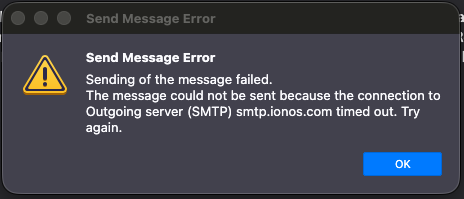
I have used Thunderbird on a MacBook Pro Max M4 for a while now. It worked fine until starting last Monday. Ever since then, I have to go to 1&1/IONOS e-mail on the web to send e-mails or use my iPhone and blind copy myself. It’s a pain going back and forth. 1&1/IONOS tech support helped me make sure all settings for the outgoing server (smtp) were and are correct. Tests on both incoming and outgoing ports are successful in the Thunderbird settings, so I don't understand why my e-mails are not sending. I have no problem receiving e-mails on Thunderbird. This problem on outgoing e-mails applies to both text-only e-mails and e-mails with attachments. Screenshots are attached. There is 17.9GB worth of data. Do I perhaps need to delete some of it? I archive old e-mails offline once a year, generally in January for the previous calendar year. Thanks, Tim
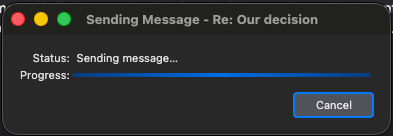
Attached screenshots

All Replies (1)

Timeout like that on Windows are usually indicative of an antivirus problem. DO you have one installed? perhaps scanning email?

Still et spørsmål

You must log in to your account to reply to posts. Please start a new question, if you do not have an account yet.