Outlook email authenticated but not connected via imap

One of my two outlook email accounts no longer appears in Thunderbird, which says it is authenticated but not connected. This happened suddenly. I can still get the messages by going onto outlook.com. How do I get it back on Thunderbird?
Endret av Wayne Mery
All Replies (15)
Open the account on outlook.com, under Settings, Mail, Forwarding & IMAP, check that IMAP is enabled.
Thank you. Unfortunately that hasn't solved it. It also sometimes says Command Error 12.
Searching on the Command Error 12 message gives several discussions, but first do the simple checks, i.e. confirm settings: outlook.office365.com, 993 (IMAP), 995 (POP), SSL/TLS, OAuth2, email address; smtp.office365.com, 587, STARTTLS, OAuth2, email address. Disable VPN if one is used.
An old topic suggests toggling mail.server.default.send_client_info to false in Settings/General/Config. editor might eliminate the error.
Confirm the settings in Outlook, Mozilla or Thunderbird? I can't find those you refer to in any of them at present. Thank you for being helpful.
In TB, Account Settings, Server Settings for the incoming, Outgoing Server (SMTP) at bottom of left pane of Account Settings for the outgoing.
It all looks OK, and my two outlook accounts look identical, but one is working and the other isn't.
You're very kind.
I have done a workaround by getting Outlook to forward the emails from the non-working one to the other, so that they do now appear in Thunderbird, but it's a bit clunky.
So, is only one of the outlook accounts registered in TB? Or are both of them visible but one is not functioning, receiving and/or sending? If the non-working one is in TB, did you see any difference after making the config. editor change?
Both visible but one not functioning. I did try that but the "operation did not succeed". Thank you.
Not receiving or sending. The name of the account shows in TB, and that there is an Inbox, but no Sent etc boxes, and the Inbox says there are no messages, which is not correct, as I can see them in Outlook.
Open Account Settings, select Server Settings, and note the Server Type. Is it IMAP or POP? If it's IMAP, the server should be outlook.office365.com on port 993. Port 995 for POP, same server.
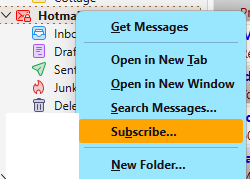
Right-click the account in the Folder Pane, Subscribe..., Refresh. Can you select the missing folders?
You might be better off just deleting the account from Account Settings, restarting TB, and adding it back from ≡ - New Account - Email (first disable account hub in Settings/General).
I can't find the first suggested options. The inbox shows as being there anyway but says that there are no messages, which is incorrect. I don't want to delete the account now that it's forwarding to the other one, as I'm scared of affecting that one. Thanks again.
See attached picture (for IMAP).
If you've set up forwarding through webmail settings, removing the account from TB won't affect forwarding to the other account.