


Appeal left on my screen after donating. How to remove in layman's language please

Suggest that the company removes its appeals after receiving a donation. I have had one stuck on my screen nearly two years. I would like to get rid of it please.
Suggest that the company removes its appeals after receiving a donation. I have had one stuck on my screen nearly two years. I would like to get rid of it please.
All Replies (6)
I'm not quite sure what you are seeing but if you go to Settings the first thing is a tick box to show the Start Screen. Try un-ticking it.
Thank you. However, when I put Search into the Search box no tickbox appears for me to delete. (I have Windows 11).
- click settings>general and it's the first item on the right - the start screen,
Press Alt-e and a drop-down menu appears. The next-to-bottom item is Settings. Click that and the first thing you'll see is the box.
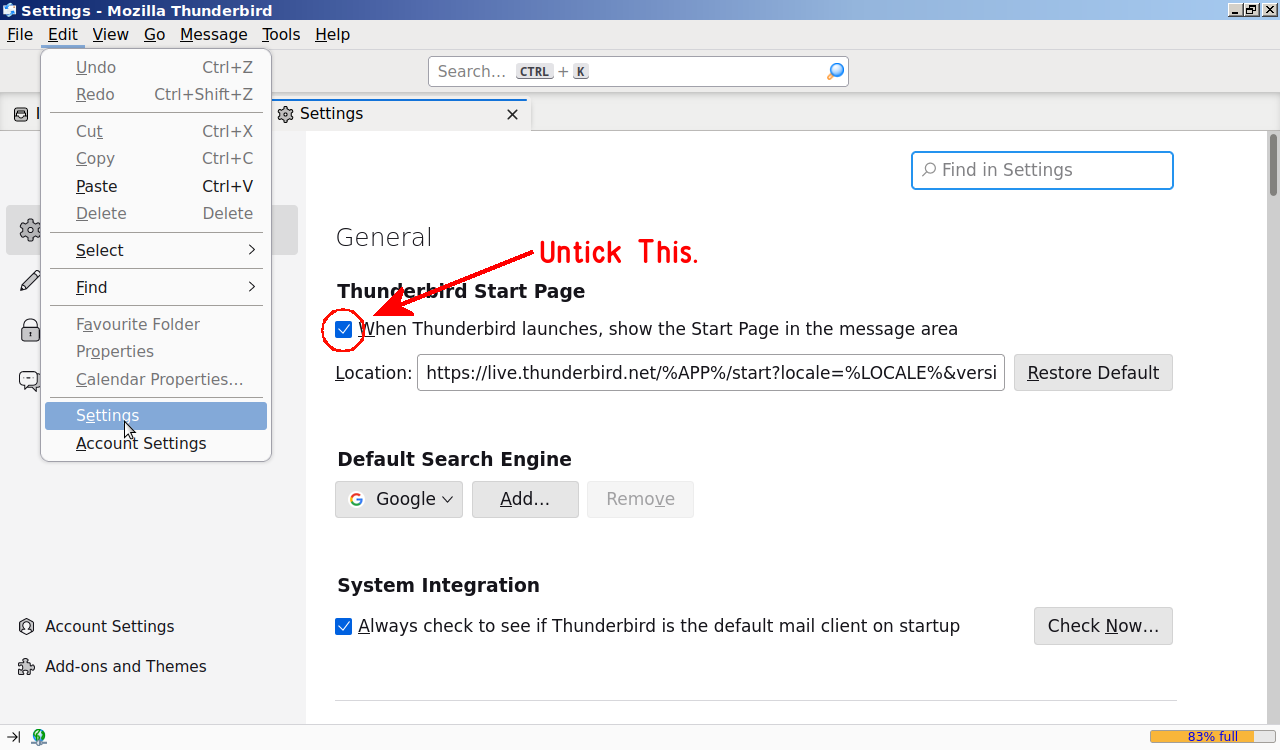
Endret av Joe Freeman
Thanks. However,each time I have pressed Alt-e nothing at all happens.
- click the menu in upper right
- then click 'settings'
- in settings>general, the top item is the start page. Just untick.