


Windows 10 bereikte EO (einde ondersteuning) op 14 oktober 2025. Als je Windows 10 gebruikt, lees dan dit artikel.

Windows 10 reached EOS (end of support) on October 14, 2025. If you are on Windows 10, see this article.

Zoeken in Support

Vermijd ondersteuningsscams. We zullen u nooit vragen een telefoonnummer te bellen, er een sms naar te sturen of persoonlijke gegevens te delen. Meld verdachte activiteit met de optie ‘Misbruik melden’.

Meer info
Deze conversatie is gearchiveerd. Stel een nieuwe vraag als u hulp nodig hebt.
Opgelost Gearchiveerd

Firefox 22 changed and locked Windows 7 title bar (big and bold)

MIkeyLV

Not sure why the decision was made to map to Windows settings, but the upgrade from FF21 to FF22 has also changed and locked my Windows 7 Toolbar font settings (active and inactive). They are now big and bold. While I can change the color, I cannot change the font, font size, or unbold (stays bold regardless of "B" being highlighted or not).

Not sure if anyone else has this issue, but it just made my Windows ugly.

See the image. Color is changed, but the font isn't a size 6 and it's also bold when shouldn't be.
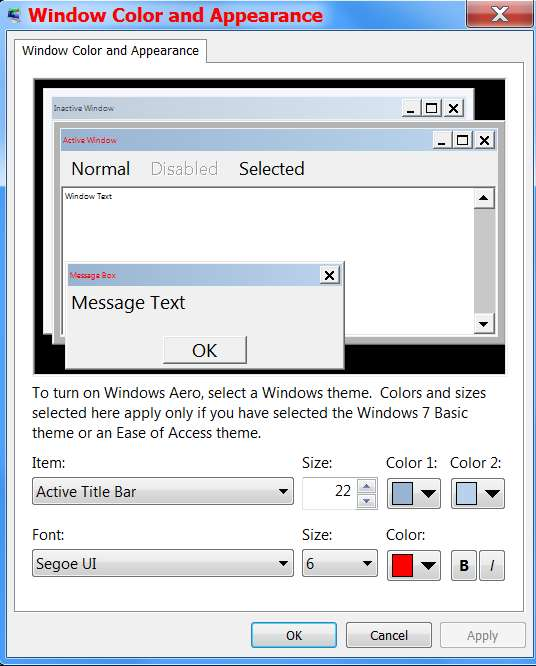
Not sure why the decision was made to map to Windows settings, but the upgrade from FF21 to FF22 has also changed and locked my Windows 7 Toolbar font settings (active and inactive). They are now big and bold. While I can change the color, I cannot change the font, font size, or unbold (stays bold regardless of "B" being highlighted or not). Not sure if anyone else has this issue, but it just made my Windows ugly. See the image. Color is changed, but the font isn't a size 6 and it's also bold when shouldn't be.

Alle antwoorden (2)

See the image. Color is changed, but the font isn't a size 6 and it's also bold when shouldn't be.

Gekozen oplossing

Fix by reverting to a pre-FF22 registry backup entry for: HKEY_CURRENT_USER Control Panel Desktop WindowsMetrics

You can't really modify the entries in regedit as they are hex data values. But this did (after a few hours) solve my problem.