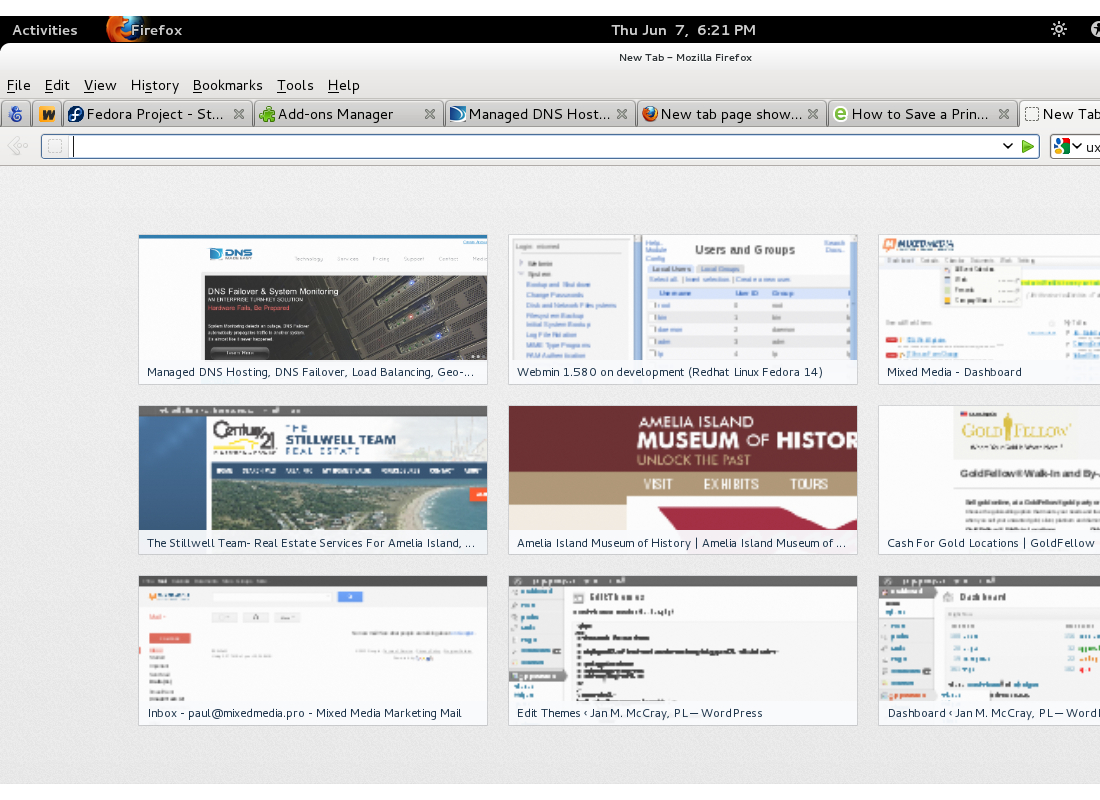
New tab page shows tiled and poorly sized thumbnails

Just upgraded from 12 to 13, new tab page looks awful. Most of the images show tiled versions of the webpages, with about 1.8 copies of each page horizontally and 1.5 vertically in each image.
Gekozen oplossing
Try to disable hardware acceleration.
- Tools > Options > Advanced > General > Browsing: "Use hardware acceleration when available"
Alle antwoorden (2)
Gekozen oplossing
Try to disable hardware acceleration.
- Tools > Options > Advanced > General > Browsing: "Use hardware acceleration when available"

Hiya! First Off: I Love Your Work! Firefox is great and thank you for giving it to us :)
I'm having the same problem listed above. Disabling hardware accelaration did not fix it. I'm on Firefox 13, Linux - Beefy Miracle. I'm including a screenshot.
Any suggestions?
oh, quick side note: Window's users get a cool orange Firefox badge to the left of the tabs... linux users just get a plain text Firefox link. Can't wait to get the attractive aesthetics made available to windows' users!