Windows 10 bereikte EO (einde ondersteuning) op 14 oktober 2025. Als je Windows 10 gebruikt, lees dan dit artikel.

Windows 10 reached EOS (end of support) on October 14, 2025. If you are on Windows 10, see this article.

Zoeken in Support

Vermijd ondersteuningsscams. We zullen u nooit vragen een telefoonnummer te bellen, er een sms naar te sturen of persoonlijke gegevens te delen. Meld verdachte activiteit met de optie ‘Misbruik melden’.

Meer info

Deze conversatie is gearchiveerd. Stel een nieuwe vraag als u hulp nodig hebt.

Incoming Attachment in Email

  • 1 antwoord
  • 2 hebben dit probleem
  • 111 weergaven
  • Laatste antwoord van Matt
  • Gearchiveerd

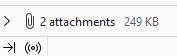
When receiving an email with an attachment I can no longer click on the attachment icon in the message to view it. Also the Save As, Save All which was always at the bottom of an email with an attachment is no longer there since my latest automatic update. The only way to view an attachment is to go to the MESSAGE tab, then Attachments and then choose what I want to do. It's 3-4 more steps than it used to.

Also, for a message that has several replies, my preference is to view it unthreaded but Thunderbird keeps changing it back to Threaded. I can change that setting but how do I make that default?

When receiving an email with an attachment I can no longer click on the attachment icon in the message to view it. Also the Save As, Save All which was always at the bottom of an email with an attachment is no longer there since my latest automatic update. The only way to view an attachment is to go to the MESSAGE tab, then Attachments and then choose what I want to do. It's 3-4 more steps than it used to. Also, for a message that has several replies, my preference is to view it unthreaded but Thunderbird keeps changing it back to Threaded. I can change that setting but how do I make that default?

Alle antwoorden (1)

Please explain further. I use Thunderbird 115 on windows 11. When I get an email with attachments the following appears at the bottom of the mail When I click on that items > I get a pane with the actual attachments in it.