Windows 10 bereikte EO (einde ondersteuning) op 14 oktober 2025. Lees voor meer informatie dit artikel.

Windows 10 reached EOS (end of support) on October 14, 2025. For more information, see this article.

Zoeken in Support

Vermijd ondersteuningsscams. We zullen u nooit vragen een telefoonnummer te bellen, er een sms naar te sturen of persoonlijke gegevens te delen. Meld verdachte activiteit met de optie ‘Misbruik melden’.

Meer info

Deze conversatie is gearchiveerd. Stel een nieuwe vraag als u hulp nodig hebt.

Default fonts not showing correctly

  • 2 antwoorden
  • 0 hebben dit probleem
  • 218 weergaven
  • Laatste antwoord van zeroknight

meer opties

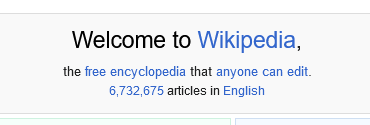
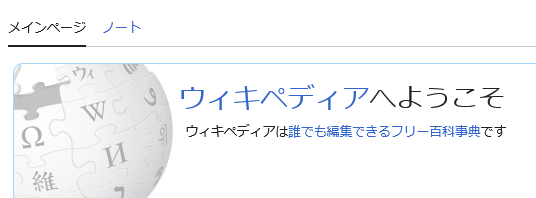
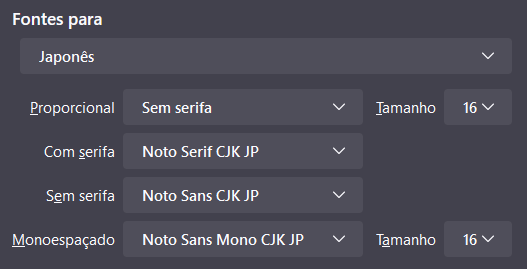
I have defined custom fonts for some languages, but they're not appearing as I defined them. Instead, the OS default fonts are showing up.

This is happening after I reinstalled Firefox in my device. Before that, the fonts were appearing as defined.

For example: English text is using Arial instead of Noto Sans, and Japanese text is using Meiryo instead of Noto Sans CJK JP.

For the Japanese font, it does show up correctly in the address bar, but not in the page itself.
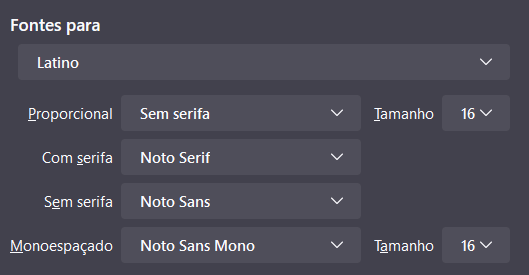
I have defined custom fonts for some languages, but they're not appearing as I defined them. Instead, the OS default fonts are showing up. This is happening after I reinstalled Firefox in my device. Before that, the fonts were appearing as defined. For example: English text is using Arial instead of Noto Sans, and Japanese text is using Meiryo instead of Noto Sans CJK JP. For the Japanese font, it does show up correctly in the address bar, but not in the page itself.
Gekoppelde schermafbeeldingen

Gekozen oplossing

I tried to reinstall with the new version (119) and the problem was fixed.

Dit antwoord in context lezen 👍 0

Alle antwoorden (2)

meer opties

Gekozen oplossing

I tried to reinstall with the new version (119) and the problem was fixed.

meer opties

Fingerprinting protection has been added to Strict Tracking Protection which uses a hard-coded list of visible fonts. You can switch to Custom mode and disable "Suspected fingerprinters" if fonts are more of a priority.