


Japanese characters are not appearing. (SOLVED)
I just installed Firefox to my laptop and noticed that Japanese characters are not working. I tried to change the language from english to japanese because I thought it would install the characters but didn't work and rolled back to english. I need to read japanese texts in webpages.... I also checked text decoding from settings > more > text decoding. Unicode is selected and I cannot change to anything else, it is unselectible. What should I do to be able to use the browser properly?
Bewerkt door Bond op
Gekozen oplossing
Hi everyone!! I found the solution. Yes it is like Terry said, I had to install the unicode support to my linux, not a problem about Firefox.
So, I fixed the issue. I'm sharing here so others who face this issue can fix their problem as well. It is so easy to fix.
Source and detailed explanation: https://leewc.com/articles/unicode-crouton-how-to/
`$ sudo apt-get install language-selector-gnome`
`$ gksu gnome-language-selector`
`$ sudo locale-gen`
`$ sudo apt-get install fcitx`
(This is the input method of choice, you can instal whatever you wish) `$ sudo apt-get install fcitx-googlepinyin` or `$ sudo apt-get install ibus-googlepinyin` or `$ sudo apt-get install xim-googlepinyin`
(regardless of the input method, use this to run the imput method configuration) `$ im-config`
Dit antwoord in context lezen 👍 0Alle antwoorden (6)

Open Settings. On the first page (General here) there is a heading Language. The second option below that heading is "Choose your preferred language for displaying pages"; there is a button labelled Choose.
You need a Japanese font installed on your system.
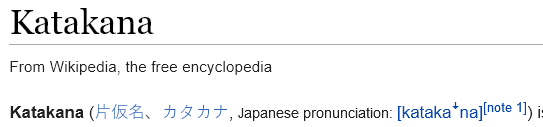
If take, for example, this page:
https://en.wikipedia.org/wiki/Katakana
what appears in the parentheses in the first paragraph -- do you have incorrect characters, or tall rectangles with character numbers, or something else?


[v56+] Type about:preferences#general<enter> in the address box. Under fonts and colors, press the Advanced button. Scroll to the bottom, turn on Allow Web Sites To Choose Their Own.
Make sure you haven't enabled a High Contrast theme in the OS settings.
- We have seen reports that this can be caused by a problem with fonts like Roboto or Helvetica that
you have installed locally and that might be corrupted or are missing some variants. Also, make sure you allow pages to choose their own fonts and that you do not block remote (downloadable) fonts.
- https://support.mozilla.org/questions/1325619 Weird font on some website's
- If you use uBlock Origin make sure not to "block remote fonts".
Gekozen oplossing
Hi everyone!! I found the solution. Yes it is like Terry said, I had to install the unicode support to my linux, not a problem about Firefox.
So, I fixed the issue. I'm sharing here so others who face this issue can fix their problem as well. It is so easy to fix.
Source and detailed explanation: https://leewc.com/articles/unicode-crouton-how-to/
`$ sudo apt-get install language-selector-gnome`
`$ gksu gnome-language-selector`
`$ sudo locale-gen`
`$ sudo apt-get install fcitx`
(This is the input method of choice, you can instal whatever you wish) `$ sudo apt-get install fcitx-googlepinyin` or `$ sudo apt-get install ibus-googlepinyin` or `$ sudo apt-get install xim-googlepinyin`
(regardless of the input method, use this to run the imput method configuration) `$ im-config`
jscher2000 said
If take, for example, this page: https://en.wikipedia.org/wiki/Katakana what appears in the parentheses in the first paragraph -- do you have incorrect characters, or tall rectangles with character numbers, or something else?
it was just question marks in squares, but now I see the actual characters and I can also type in japanese after the fix.