


Normal procedure doesn't clear cookies/site data. How to remove remaining MB?

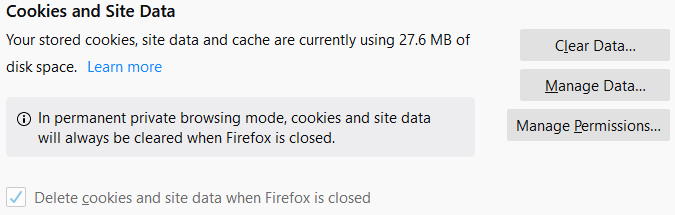
I open Firefox after starting my computer. Go to Options > Privacy & Security > Clear History > Everything (with ALL options selected) > Clear Now It appears to clear the history Go to Options > Privacy & Security > Cookies and Site Data > Clear Data > Check Cached Web Content (27.6 MB) > Clear It appears to clear the cookies and data HOWEVER, the Privacy & Security page still indicates 27.6 MB remain cached as shown in the attached image I do not have any sites listed in Manage Data or Manage Permissions How can I remove this remain 27.6 MB? Thanks in advance for any advice. Cheers HelpaNoob
Gekozen oplossing
Location of the cache/cache2 folder; Windows: *C:\Users\<user>\AppData\Local\Mozilla\Firefox\Profiles\<profile>\ Mac: ~/Library/Caches/Firefox/Profiles/ Linux: ~/.cache/mozilla/firefox/
Close Firefox. Open your file browser to the above, and remove the folder.
https://addons.mozilla.org/en-US/firefox/addon/empty-cache-button/ Empty Cache Button by mvm Cache clearing made easy. One click.
Dit antwoord in context lezen 👍 0Alle antwoorden (3)

Gekozen oplossing
Location of the cache/cache2 folder; Windows: *C:\Users\<user>\AppData\Local\Mozilla\Firefox\Profiles\<profile>\ Mac: ~/Library/Caches/Firefox/Profiles/ Linux: ~/.cache/mozilla/firefox/
Close Firefox. Open your file browser to the above, and remove the folder.
https://addons.mozilla.org/en-US/firefox/addon/empty-cache-button/ Empty Cache Button by mvm Cache clearing made easy. One click.
That did the trick! Thank you for the quick response. Cheers
Glad to help. Safe Surfing.