


How can I reset the height of dropdown menu?

Hello.
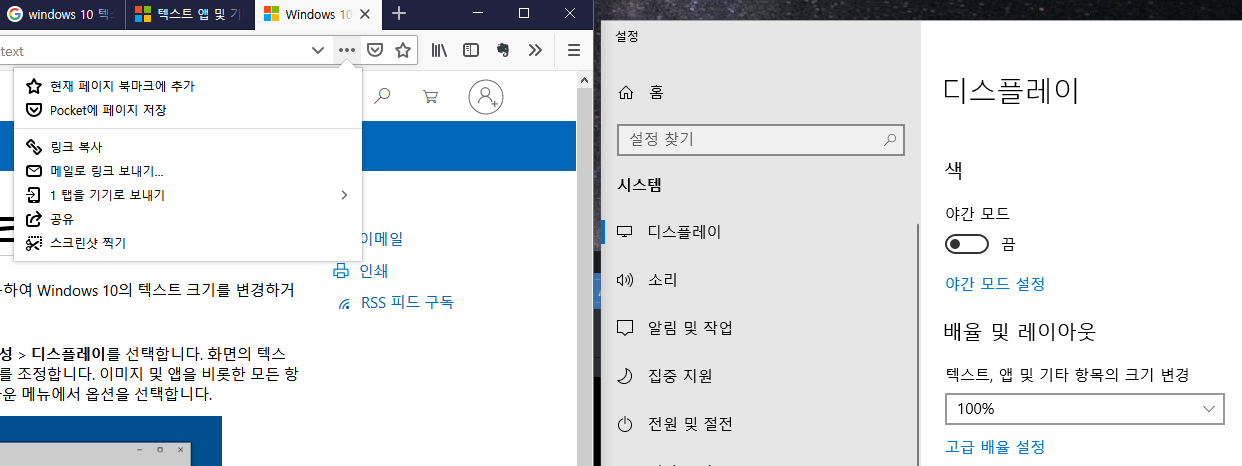
After I install some Add-on, my firefox dropdown menu get weird. The Add-on may be 'Google Keep' something. It make my menu shorten! Please look at my dropdown menu in pictures. Even I try to uninstall plug-in and Firefox and re-install, this problem didn't solved.
This problem happened in History/Bookmark button, Other Add-on button, even Menu button. I only see two or three lines in dropdown menu.
How can I reset the height of dropdown menu?
Gekozen oplossing
I just found the solution, but is it correct solution technically?
Windows 10 setting -> "Display" -> "텍스트, 앱 및 기타 항목의 크기 변경(Text, App's size)" -> select 100% or 150% or 200%, not 125%
125% was my setting for Wacom Companion 2. I changed that setting to 100%, than problem has disappeared. (but 100% is too small to read text and 200% is too big)
Check the picture I added. (text is Korean) And thanks for reply.
Bewerkt door Yeokbo op
Alle antwoorden (6)
Here's the picture. It's "Menu".

I try to reset in "help -> safe mode -> reflesh". I tried to Safe mode, but doesn't work. Reflesh works half, but dropdown menu fixed only in Monitor #2. In Monitor #1, it still shorten.
but Chrome's dropdown menu still work well even in Monitor #1.
I'm trying update the VGA driver now.
Bewerkt door Yeokbo op
even I update VGA driver, Dropdown menu still shorten. (No problem in Chrome and other browsers)
- AMD Ryzen 5 1600
- NVIDEA GeForce GTX 1050 Ti (driver v. 418.81)
- Mornitor #2(main): 1920*1080
- Mornitor #1(Wacom Companion 2): 2560*1440
Bewerkt door Yeokbo op
You can try to disable hardware acceleration in Firefox.
- Options/Preferences -> General: Performance
remove checkmark: [ ] "Use recommended performance settings"
remove checkmark: [ ] "Use hardware acceleration when available" - https://support.mozilla.org/en-US/kb/performance-settings
Close and restart Firefox after modifying the setting for changes to take effect.
You can check if there is an update for your graphics display driver and check for hardware acceleration related issues.
cor-el said
You can try to disable hardware acceleration in Firefox.Close and restart Firefox after modifying the setting for changes to take effect. You can check if there is an update for your graphics display driver and check for hardware acceleration related issues.
- Options/Preferences -> General: Performance
remove checkmark: [ ] "Use recommended performance settings"
remove checkmark: [ ] "Use hardware acceleration when available"- https://support.mozilla.org/en-US/kb/performance-settings
Thank you for your reply, but problem doesn't solved.
Gekozen oplossing
I just found the solution, but is it correct solution technically?
Windows 10 setting -> "Display" -> "텍스트, 앱 및 기타 항목의 크기 변경(Text, App's size)" -> select 100% or 150% or 200%, not 125%
125% was my setting for Wacom Companion 2. I changed that setting to 100%, than problem has disappeared. (but 100% is too small to read text and 200% is too big)
Check the picture I added. (text is Korean) And thanks for reply.
Bewerkt door Yeokbo op