

Deze conversatie is gearchiveerd.
Stel een nieuwe vraag als u hulp nodig hebt.

Gearchiveerd
address book export not visible in menu

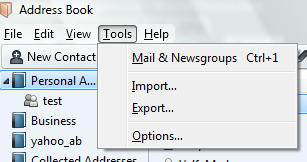
Hello, I want to transfer my address book to another computer, but in the Tools Menu, there is no Export option, only Import. How can I retrieve the Export function?
Hello,
I want to transfer my address book to another computer,
but in the Tools Menu, there is no Export option, only Import.
How can I retrieve the Export function?

Alle antwoorden (1)
Your image looks very odd. That toolbar does not relate to the 'Address Book', it is a toolbar for emails and folders.
Also you have the Personal Address Book showing in a tab instead of a new window, so it does not have the correct toolbar. Are you using some addon for this ?
From the image you posted ; Tools > Address Book should open the Address Book in it's own window with it's own correct Toolbar. Then 'Tools' > Export'
Bewerkt door Toad-Hall op