Windows 10 bereikte EO (einde ondersteuning) op 14 oktober 2025. Als je Windows 10 gebruikt, lees dan dit artikel.

Windows 10 reached EOS (end of support) on October 14, 2025. If you are on Windows 10, see this article.

Zoeken in Support

Vermijd ondersteuningsscams. We zullen u nooit vragen een telefoonnummer te bellen, er een sms naar te sturen of persoonlijke gegevens te delen. Meld verdachte activiteit met de optie ‘Misbruik melden’.

Meer info
Deze conversatie is gearchiveerd. Stel een nieuwe vraag als u hulp nodig hebt.
Gearchiveerd

when browsing with night mode, images are drawn incorrectly

Chris Ilias beantwoord
ubuntu_gone

When switching into night mode on my iPad 10.5in, images that used to be drawn properly on non-night mode are redrawn (after refreshing or browsing to new pages) suddenly blocky, looking like a puzzle (blocks drawn in different places) or the blocks look like a video mode full of rainbow fuzzy (remember the old VESA modes? like that).

Hopefully you can fix this. Mostly I'm night-mode on reddit if you want to see some easy examples.

Tracking mode on or off, that doesn't matter. All other settings are stock-standard.

When switching into night mode on my iPad 10.5in, images that used to be drawn properly on non-night mode are redrawn (after refreshing or browsing to new pages) suddenly blocky, looking like a puzzle (blocks drawn in different places) or the blocks look like a video mode full of rainbow fuzzy (remember the old VESA modes? like that). Hopefully you can fix this. Mostly I'm night-mode on reddit if you want to see some easy examples. Tracking mode on or off, that doesn't matter. All other settings are stock-standard.

Alle antwoorden (1)

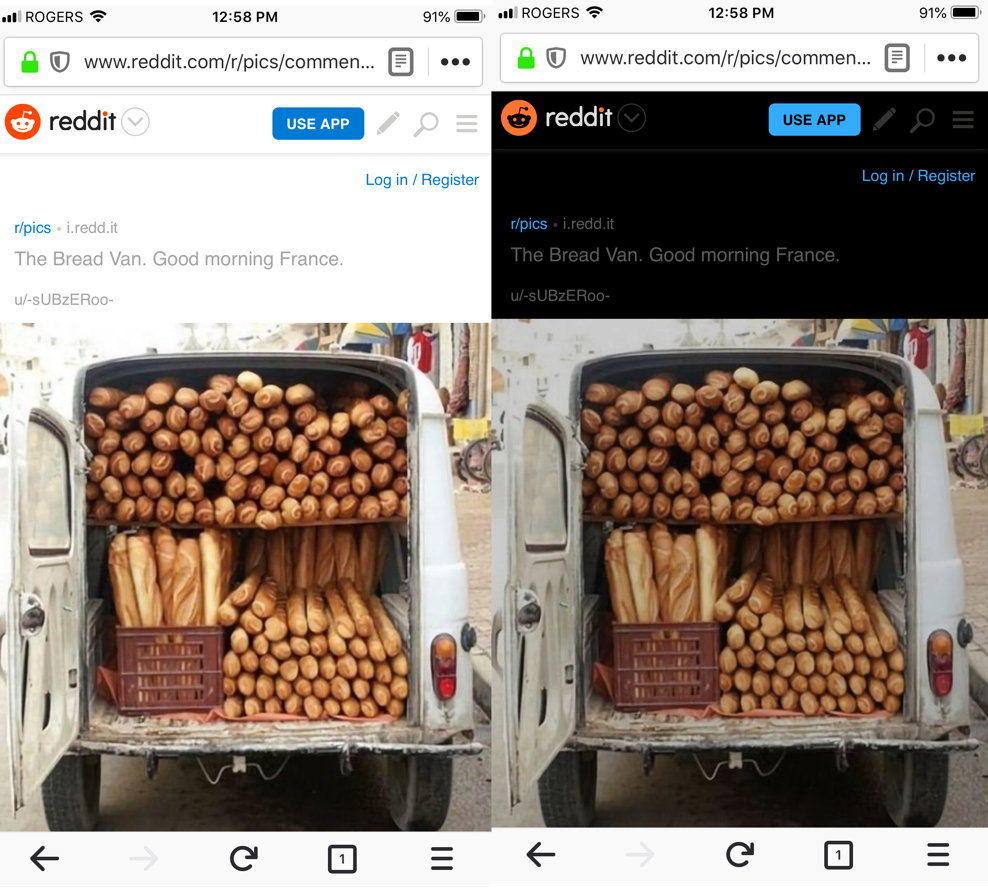
Hi, I've tried testing a reddit thread to see if I can reproduce the issue, but I don't a difference in the images. I've attached a screenshot.

Could you provide an example URL and screenshots, so we can get a better idea of what you're seeing?