


Disable the "Did you wanted to open ... " Popup Tab

Hello,
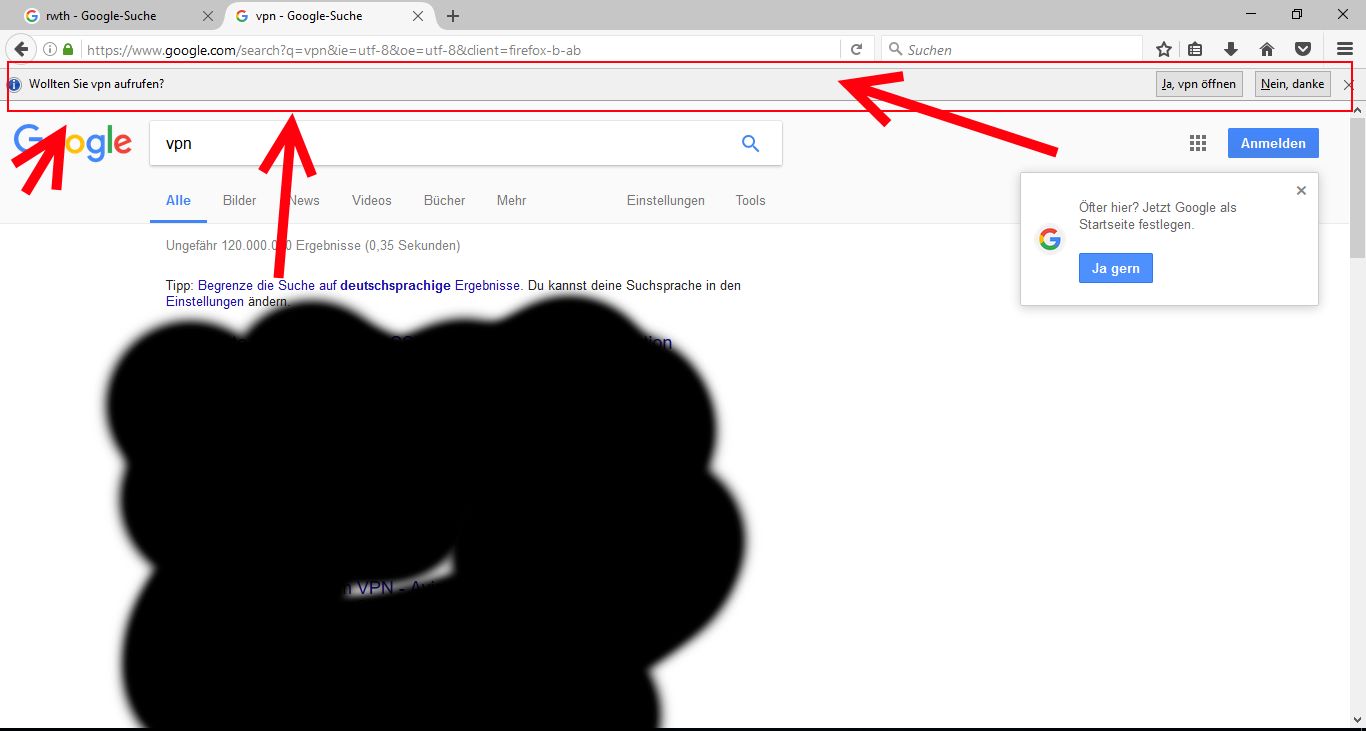
I just installed Firefox 50.1 and everytime I search for a keyword in the adress bar for Google, this popup tab appears. How do i get rid of it?
Alle antwoorden (3)
Not sure why Image wasn't posted, but heres the imgur link to it: http://imgur.com/a/1M0YP
As you can see, I just type "vpn" in the bar, hit enter, got on Google webpage and there it is. Started Firefox in safe mode, still there...
Bewerkt door Tanckom op
That is about this whitelist.
- browser.fixup.domainwhitelist.*
- https://msujaws.wordpress.com/2014/08/01/faster-and-snappier-searches-now-in-firefox-aurora/
You can check if there is an entry for vpn (browser.fixup.domainwhitelist.vpn) and possibly create a new Boolean pref with this name and value true (see browser.fixup.domainwhitelist.localhost)
You can open the about:config page via the location/address bar. You can accept the warning and click "I'll be careful" to continue.
- https://dxr.mozilla.org/l10n-mozilla-release/source/de/browser/chrome/browser/browser.properties#152
# Keyword fixup messages
# LOCALIZATION NOTE (keywordURIFixup.message): Used when the user tries to visit
# a local host page, by the time the DNS request recognizes it, we have already
# loaded a search page for the given word.  An infobar then asks to the user
# whether he rather wanted to visit the host.  %S is the recognized host.
Bewerkt door cor-el op
Hello, Thanks for your answer. However I want to turn this COMPLETELY off. Since the same pop up arrives for "Photoshop" (as a test) and theres no browser.fixup.domainwhitelist.photoshop entry. I don't want to edit an entry or click No all the time. :/