


Windows 10 bereikte EO (einde ondersteuning) op 14 oktober 2025. Als je Windows 10 gebruikt, lees dan dit artikel.

Windows 10 reached EOS (end of support) on October 14, 2025. If you are on Windows 10, see this article.

Zoeken in Support

Vermijd ondersteuningsscams. We zullen u nooit vragen een telefoonnummer te bellen, er een sms naar te sturen of persoonlijke gegevens te delen. Meld verdachte activiteit met de optie ‘Misbruik melden’.

Meer info

Deze conversatie is gearchiveerd. Stel een nieuwe vraag als u hulp nodig hebt.

Disable "Recommended" topmost item in Location Bar list

  • 2 antwoorden
  • 1 heeft dit probleem
  • 43 weergaven
  • Laatste antwoord van andygoth
  • Opgelost

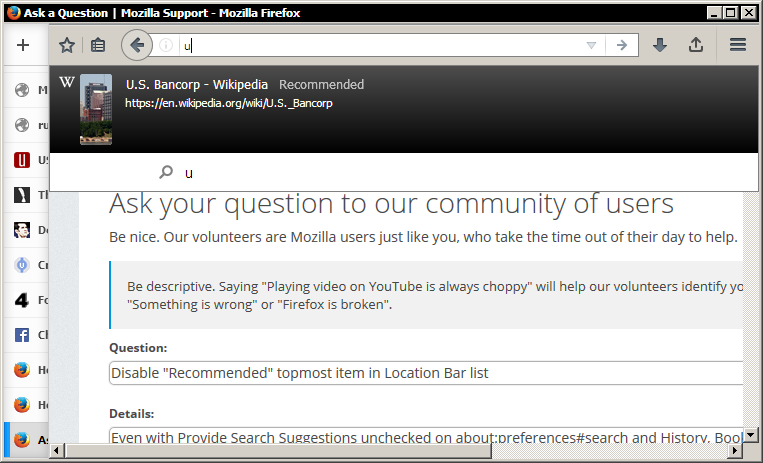
Even with Provide Search Suggestions unchecked on about:preferences#search and History, Bookmarks, and Open Tabs unchecked on about:preferences#privacy, the location bar still suggests one "Recommended" item at the top of the list, even above the option to use a search engine. It is displayed in a different style than any other item. Most confusingly, it's often a website I have never visited, so it can't possibly be getting pulled from my history and is therefore almost always useless to me. How do I disable this? Putting it above every other item means I just have to skip past it to find what I'm really looking for. It behaves essentially like an advertisement, and when it pops up after I've typed only one or two letters, it's virtually guaranteed to not be relevant to what I'm actually looking for.
Even with Provide Search Suggestions unchecked on about:preferences#search and History, Bookmarks, and Open Tabs unchecked on about:preferences#privacy, the location bar still suggests one "Recommended" item at the top of the list, even above the option to use a search engine. It is displayed in a different style than any other item. Most confusingly, it's often a website I have never visited, so it can't possibly be getting pulled from my history and is therefore almost always useless to me. How do I disable this? Putting it above every other item means I just have to skip past it to find what I'm really looking for. It behaves essentially like an advertisement, and when it pops up after I've typed only one or two letters, it's virtually guaranteed to not be relevant to what I'm actually looking for.
Gekoppelde schermafbeeldingen

Gekozen oplossing

hi andygoth, this is coming from the universal search test pilot experiment that you have installed i guess: https://testpilot.firefox.com/experiments/universal-search

Dit antwoord in context lezen 👍 1

Alle antwoorden (2)

Gekozen oplossing

hi andygoth, this is coming from the universal search test pilot experiment that you have installed i guess: https://testpilot.firefox.com/experiments/universal-search

Good call, that was exactly right. Interesting coincidence that Universal Search is shutting down tomorrow, guess this problem would have fixed itself, heh. Thank you very much.