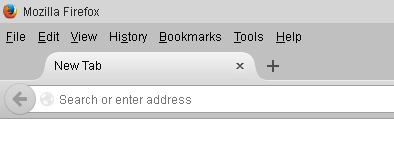
Tab background partially missing in Windows 10

Hi,
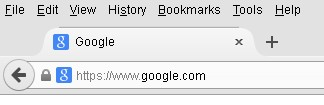
Installing Firefox on Windows 10 has yielded a few issues. One of the main ones is that on the browser tabs, the little shadow edge is missing on the curved areas of the tabs. It only shows at the top, where there is a single line that stops right where the curves begin. When I use Classic Them Restorer to tweak things, I can sometimes see the base of the shadow edge curves but they do not align with the tab curves.
This happens on a clean install, and with or without Classic Theme Restorer.
Any ideas on what this may be?
Thanks,
Steve
Alle antwoorden (6)
Here is a picture that shows the issue.
Bewerkt door stevehal op
You might be able to fix the border with some code in a userChrome.css file in a chrome subdirectory in the browser's profile. http://kb.mozillazine.org/UserChrome.css
/* Do not remove the @namespace line -- it's required for correct functioning */
@namespace url("http://www.mozilla.org/keymaster/gatekeeper/there.is.only.xul");
.tabbrowser-tab {
border: 1px solid #000 !important;
 border-bottom: none !important;
}
Start Firefox in Safe Mode to check if one of the extensions (Firefox/Tools > Add-ons > Extensions) or if hardware acceleration is causing the problem.
- Switch to the DEFAULT theme: Firefox/Tools > Add-ons > Appearance
- Do NOT click the Reset button on the Safe Mode start window
Hi,
Thanks for your replies...
finitarry - It did add the border, but in the rectangle tabs. See the pic.
cor-el - I tried Safe Mode and it was still there.
The only thing I am doing in Windows 10 is using the AeroLite theme, and I also did a font substitution with Arial used throughout most of the windows.
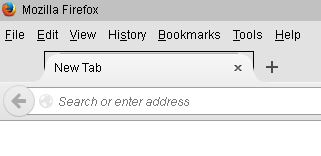
I have done a lot more experimenting. I just do not think Windows 10 will show the default theme of FireFox like it does in Windows 7/Server 2012/Vista. I do not have 8.1.
Hi,
It appears that FF40 and Windows 10 do not allow for some of the lighter style themes, even recent ones. With curved tabs you get that edge. Anyway, with some tweaking I got it like the attached picture. I have to use the Default theme with Firefox, none of the light solid themes on the addon site will hide the extra line at the top.