


Windows 10 bereikte EO (einde ondersteuning) op 14 oktober 2025. Als je Windows 10 gebruikt, lees dan dit artikel.

Windows 10 reached EOS (end of support) on October 14, 2025. If you are on Windows 10, see this article.

Zoeken in Support

Vermijd ondersteuningsscams. We zullen u nooit vragen een telefoonnummer te bellen, er een sms naar te sturen of persoonlijke gegevens te delen. Meld verdachte activiteit met de optie ‘Misbruik melden’.

Meer info
Deze conversatie is gearchiveerd. Stel een nieuwe vraag als u hulp nodig hebt.
Opgelost Gearchiveerd

How to set single-line message headers?

D. Abel

Previously, in the message display area, I had Thunderbird configured so that a message only displayed the message subject in the message header section just above the message body. But I just upgraded to TB 38.1.0, and now I have From, Subject, [Reply to] and To in the header display area, even though I have View->Headers->Normal(Compact) set.

Please advise how to get back to option just to display the Subject line. Vertical display real estate is far too valuable to not have the former display capability of one line only.

Thanks dabel@gowebway.com
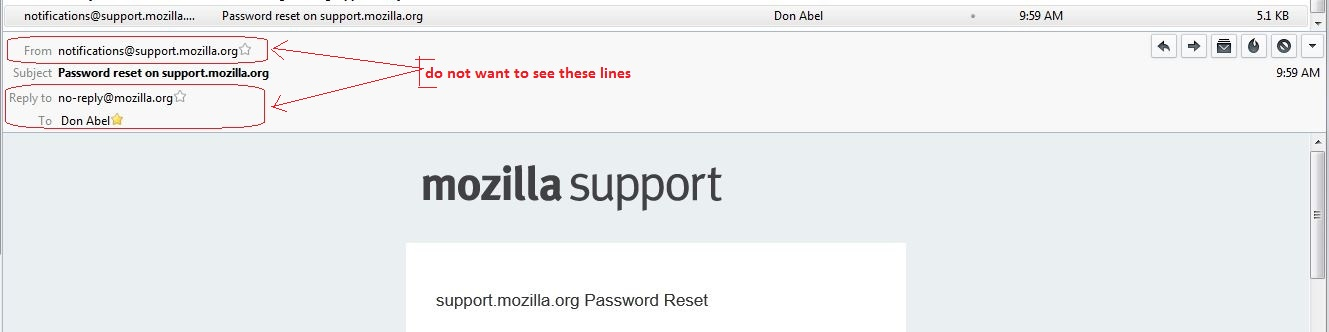
Previously, in the message display area, I had Thunderbird configured so that a message only displayed the message subject in the message header section just above the message body. But I just upgraded to TB 38.1.0, and now I have From, Subject, [Reply to] and To in the header display area, even though I have View->Headers->Normal(Compact) set. Please advise how to get back to option just to display the Subject line. Vertical display real estate is far too valuable to not have the former display capability of one line only. Thanks dabel@gowebway.com
Gekoppelde schermafbeeldingen

Alle antwoorden (2)

Gekozen oplossing

Install this add on.

https://addons.mozilla.org/en-US/thunderbird/addon/compactheader/?src=hp-dl-featured

The View Headers-Normal removes the routing info only. It has nothing to do with what you are trying to accomplish.

Thanks, Airmail, the add-on fixed the problem, that restored the functionality of View->Headers->Compact being selected.
