


I'd like to have color for the headings in the message pane.

The background color in the heading line (Subject, Correspondents, Date etc.) is white and blends in with the messages. On a previous installation of Thunderbird on a different computer it was dark grey, as was the message header area. I'd like to make a change to the white background.
Gekozen oplossing
I found the answer in the following thread
http://forums.mozillazine.org/viewtopic.php?f=39&t=2756591
The solution is to generate or modify a userchrome.css file with
treecol, .treecol-image { -moz-appearance: none !important; background-color: peachpuff !important; }
Alle antwoorden (3)
Depends upon what options you have selected in Windows.
example: I use Vista OS. Control Panel > Personalization > 'Theme' I'm using 'Windows Vista' as opposed to 'Classic'.
Control Panel > Personalization > 'Window colour and appearance' I've selected 'windows Vista Basic' in preference to Classic, standard, Aero, or any high contrast options.
This means my 'Message Pane' headers section is a pale blue background.
So the options you have got setup within Windows accessed via control Panel can effect Thunderbird.
You can always try downloading and installing another theme in Thunderbird. https://addons.mozilla.org/en-GB/thunderbird/themes/
Images below show how changing the Windows 'Personalization' can effect what you see.
- image one using standard 'windows Vista' options
- image 2 shows 'Classic'
- image 3 shows 'Aero'
- image 4 shows a high contrast.
Suggestion: check out what you have got selected first as you may be able to adjust to your liking.


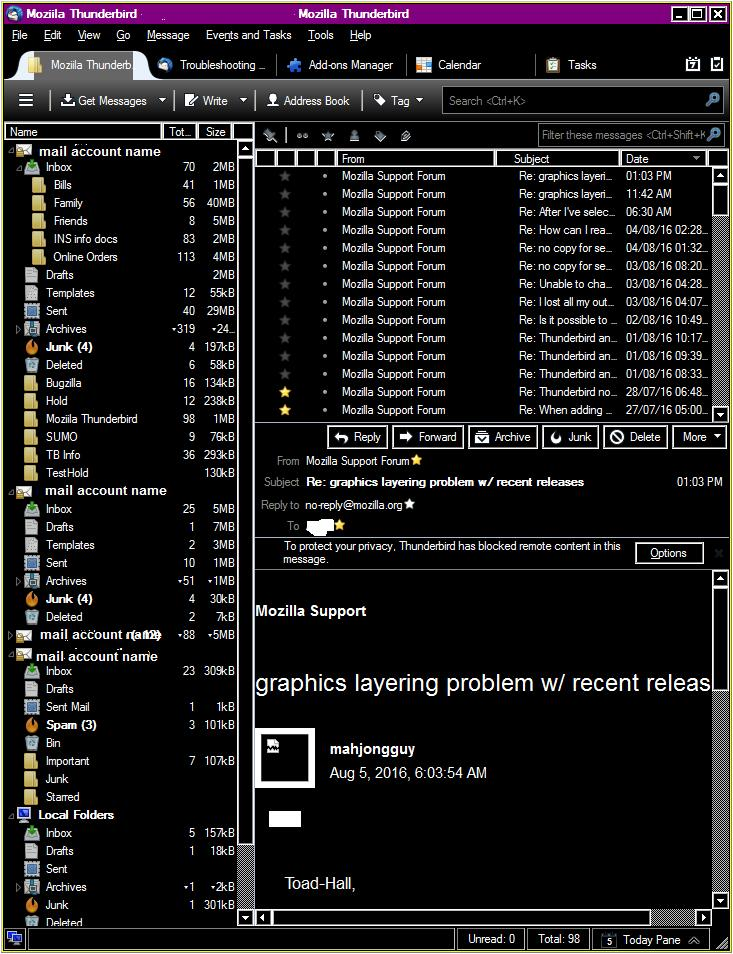
Thank you for your response, but unfortunately I am using Windows 10 and the Personalisation options are much different. You can't select 'Classic" or 'Basic' etc., but theorectically can pick the color for toolbars, and title bars, etc. However none of the selections change the background color for the line with 'subject' in you examples.
Gekozen oplossing
I found the answer in the following thread
http://forums.mozillazine.org/viewtopic.php?f=39&t=2756591
The solution is to generate or modify a userchrome.css file with
treecol, .treecol-image { -moz-appearance: none !important; background-color: peachpuff !important; }