


I have up to 3 copies of contacts in the Thunderbird Address Book and cannot find a way of deleting the extra ones

This situation only exists in Thunderbird. In Contacts there is only one entry for each person. I cannot find a way of deleting the extra contacts in Thunderbird as the "delete" icon is greyed out.
Alle antwoorden (7)

Screenshot, please, showing the greyed out delete function?
https://support.mozilla.org/en-US/kb/how-do-i-create-screenshot-my-problem
Herewith screenshotZenos said
Screenshot, please, showing the greyed out delete function? https://support.mozilla.org/en-US/kb/how-do-i-create-screenshot-my-problem
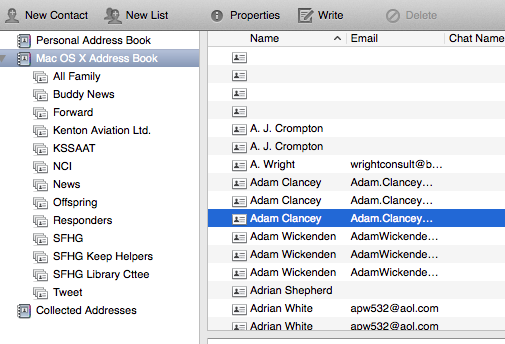
OK, that's your native Mac address book.
AFAIK, Thunderbird has only read access to it. So you won't be allowed to delete or change entries in it from Thunderbird.
Thanks, but the contacts in my native Mac Address book are not duplicated or triplicated so I cannot delete the extra ones from there. For some reason, Thunderbird has duplicated or triplicated the addresses that it has imported/read and I would like to find out why and how I can change that.
Located someone who had a similar issue. Maye this information will help. quoted section below from link:
The Mac OSX one has every entry duplicated. I can neither delete nor edit them (some are wrong). I've sorted this problem out and in case anyone's interested, the Mac Address book can only be edited within the Contacts app. As for the duplicated entries it was showing the combined entries of iCloud and Gmail address books. Over the weekend I went through them all and cleaned up the iCloud one, removing dupes, correcting and updating and incorrect entries and deleting redundant ones. Then I deleted the Gmail address book from the Macs and the iDevices, so I now only run with the one (iCloud) address book.
Sorry, but this does not help. As I said the iMac contacts are not duplicated. It seems that Thunderbird has imported contacts from 2 or 3 sources. My iMac contacts are the only contact list I keep and are backed up in iCloud but are not in Gmail. Original question - How can I delete the duplicated or triplicated contacts in the Thunderbird Address Book?
I notice you have several Mailing Lists as sub lists to the Mac address book.
Can you check something. Take one name eg: Adam Clancey This is shown 3 times. How many 'Mailing lists' is he entered in?
then check: Adrain Shepherd He is only mentioned once, so is he entered in any Mailing List ?