


Windows 10 bereikte EO (einde ondersteuning) op 14 oktober 2025. Lees voor meer informatie dit artikel.

Windows 10 reached EOS (end of support) on October 14, 2025. For more information, see this article.

Zoeken in Support

Vermijd ondersteuningsscams. We zullen u nooit vragen een telefoonnummer te bellen, er een sms naar te sturen of persoonlijke gegevens te delen. Meld verdachte activiteit met de optie ‘Misbruik melden’.

Meer info

Deze conversatie is gearchiveerd. Stel een nieuwe vraag als u hulp nodig hebt.

Getting the "..your video player might be outdated" pop-up

  • 4 antwoorden
  • 3 hebben dit probleem
  • 25 weergaven
  • Laatste antwoord van wonderchild

meer opties

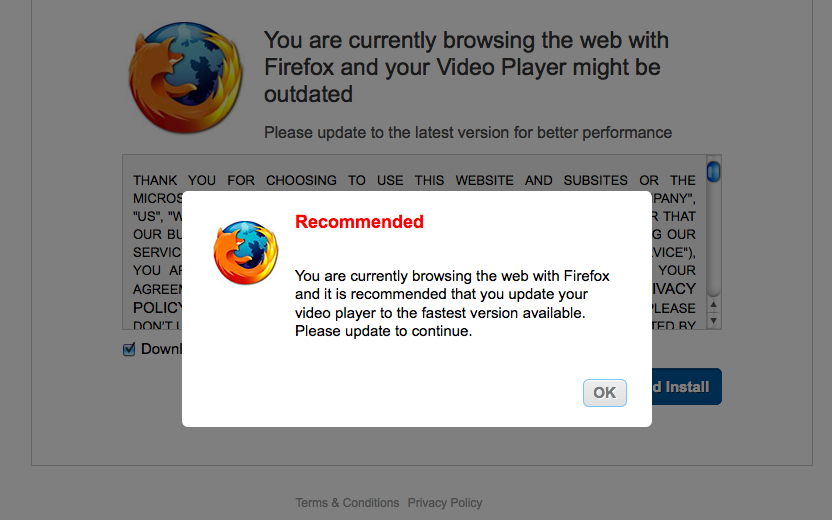
I know a bunch of people have asked this very question but I can't seem to resolve this issue. When trying to watch/stream videos on the internet, if the video is on pause and/or running for several minutes, something will pop up that says: "You are currently browsing the web with Firefox and your Video Player might be outdated" while trying to get me to install whatever it is they want you to install.

I've followed some of the advice given to others but I can't seem to avoid getting this pop-up when watching a video. I've tried running my antivirus, I went into plugins and updated Silverlight Plug In (which needed to be updated), and I even reset Firefox. But I keep getting the pop-up.

Any suggestions as to what I could do? Thank you!

I know a bunch of people have asked this very question but I can't seem to resolve this issue. When trying to watch/stream videos on the internet, if the video is on pause and/or running for several minutes, something will pop up that says: "You are currently browsing the web with Firefox and your Video Player might be outdated" while trying to get me to install whatever it is they want you to install. I've followed some of the advice given to others but I can't seem to avoid getting this pop-up when watching a video. I've tried running my antivirus, I went into plugins and updated Silverlight Plug In (which needed to be updated), and I even reset Firefox. But I keep getting the pop-up. Any suggestions as to what I could do? Thank you!

Alle antwoorden (4)

meer opties

I'll add a screenshot.

I also downloaded Chrome to see if I would have the same issue and I did. So I guess it's not the browser but my computer?
meer opties

It seems to be a pop-up virus try to use this article

meer opties

Actually you can get this site redirect even on Mac OSX and Linux to show it is not necessarily due to a virus.

meer opties

I think I fixed it! I installed Adblock Plus and that has prevented pop-ups. I tried pretty much everything people suggested and this is the only thing that has worked.

Thank you for your help.