


tabbing from subject to writing is now interrupted

I just updated to 159.0 TB seems to have a new annoying behavior. I have reproduced it on two different PCs.
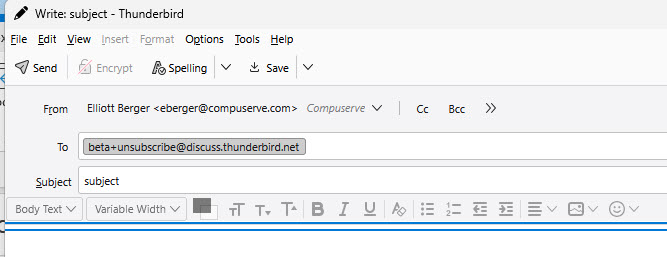
I enter an address, then tab to the subject, and then the next tab should take me to the field where I can start typing my email. Instead it takes me to two horizontal blue lines just above that field. See image. The next tab takes me to the field where I can write. It's not a big problem but a new minor annoyance.
Thoughts? Am I missing something?
All Replies (2)

Chosen Solution
What is your operating system?
I see the same thing with Thunderbird 159.0 running in Windows 10. It happens composing in both text and HTML formats. However, unlike you, I can just hit <Tab> again and the blue lines disappear and I can start typing as usual. I'd say this is a bug. I'm not in a position to report the bug today, but if you'd like to, it can be reported at
yes, the next tab works for me too. but i will go ahead and report it.