Open
Installed 157.0 / 158.0 some time ago and THIS happened to me...

Hi everyone!
I am using the add on 'sidebery' for vertical tabs.
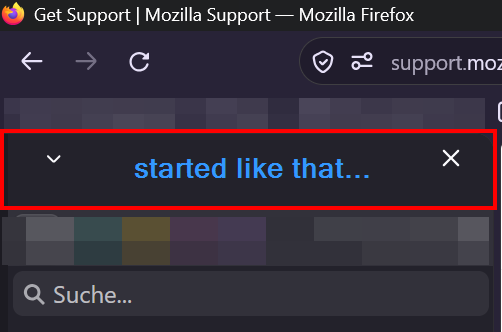
Recently I updated to FF 157.0 and saw this annoying part in the sidebar (as seen in the image attached "started like that...")!
I didn't ask for taking up space in the (3rd party, btw) sidebar that could fit almost TWO vertical tabs in it! Can you somehow make it go away completely, please?
The userChrome.css 'trick' with sidebar-header #sidebar-box {
display: none !important;
} didn't do it.
So...Fast forward and another update took place (158.0) and looking at the attached image ("now...") I can't get how THAT can be it. It want that space to be GONE for good. Like it was before. Not additionally labeled. :)
Can you make it vanish for good, pretty soon? Cheers!
Hi everyone!
I am using the add on 'sidebery' for vertical tabs.
Recently I updated to FF 157.0 and saw this annoying part in the sidebar (as seen in the image attached "started like that...")!
I didn't ask for taking up space in the (3rd party, btw) sidebar that could fit almost TWO vertical tabs in it!
Can you somehow make it go away completely, please?
The userChrome.css 'trick' with
sidebar-header #sidebar-box {
display: none !important;
}
didn't do it.
So...Fast forward and another update took place (158.0) and looking at the attached image ("now...") I can't get how THAT can be it.
It want that space to be GONE for good. Like it was before. Not additionally labeled. :)
Can you make it vanish for good, pretty soon?
Cheers!