I have a costumer in my store that has random emails saved on his desktop.

I have a costumer in my store that uses Thunderbird, it has worked fine for him for years without any issues.
But now for some reason random emails get saved to his desktop, and has no idea why that is happening.
I have checked settings to make sure it doesnt save anything to the desktop, the folder is set to save inside appdata/roaming
We have tried updating the program with no luck so far, just updated it again today. Costumer is nervous towards deleting the program and setting up his email again, I have told him that his emails and folders wont be effected. But still doesnt want us to do it.
So unless you can give confirmation that nothing will happen to his files and folders he wont let us reinstall the program.
Can you let us know if its a known bug or better yet, give us a solution, we would both be very grateful.
Kind regards
All Replies (3)
First, we're just volunteers on this peer-to-peer forum. We can't confirm that nothing will ever go wrong, and I doubt any of the Mozilla officials would either. Also, from what you posted, it is unclear on the details of what your customer was experiencing. Being your customer, my guess is he will trust you more than anyone else, as you're there to assist him.
Im unsure what im saying is unclear to you, but let me try again.
He is using thunderbird as always, to check his emails. At random times, out of nowhere randoms incoming mails will get saved to the desktop, and end up filling his desktop with emails all around the screen.
Thunderbird has the ability to save emails on your own pc. The default save folder is under Appdata/roaming.
I double checked that it wasnt using desktop folder as the save location, which it was not, it was still set to the default.
Costumer isnt actively using the pc for anything, while thunderbird is open, it will at random save random incoming emails to his desktop.
The reason for me to try and reach out to support is because i have no good answers as to why its doing what it is.
My last resort would be to make a backup of his emails and then reinstall it, what i would like is for you to confirm that its possible, and easy to do. Costumer is worried about his emails, mostly due to a bad experience with another store
I hope this sums up the problem
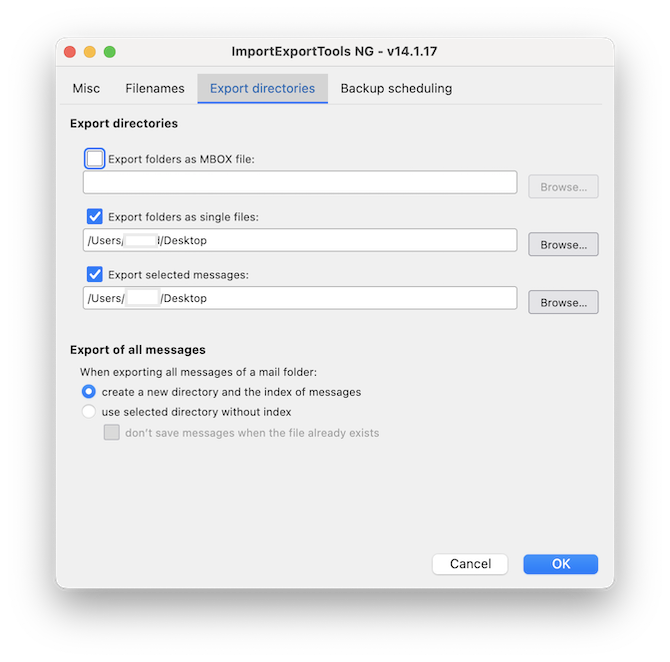
Thunderbird has a built-in feature for exporting messages in the .eml format, but there is no automaticity. The user has to select actively the messages he wants to export and then use the menu File > Save as... And you cannot create a message filter in Thunderbird to save messages on the desktop or somewhere else. Does your customer use the add-on "ImportExportTools NG" ? I am not very familiar with this add-on and no longer use it myself but I think that it allows to do automatic message backups