

This thread was archived.
Please ask a new question if you need help.

Archived
inbox e-mails are there but not visible

Inbox e-mails cannot be seen. I can click on the blank inbox and see an e-mail. By slowly moving the cursor and clicking in empty space i can still read them. How do I restore visibility? Other folders are still fully functional.
Inbox e-mails cannot be seen. I can click on the blank inbox and see an e-mail. By slowly moving the cursor and clicking in empty space i can still read them. How do I restore visibility? Other folders are still fully functional.
All Replies (2)
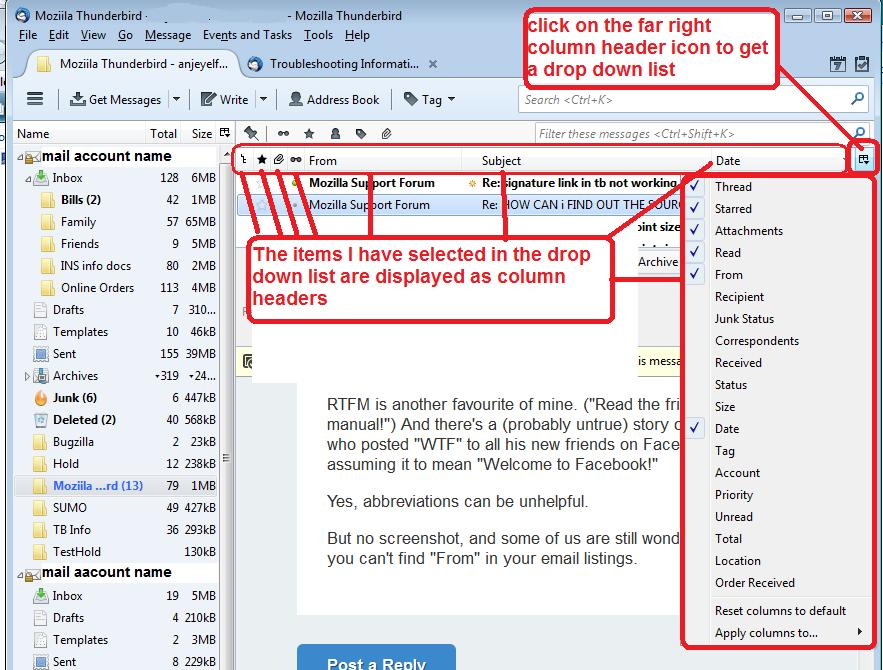
This sounds like you have an invisible list of emails. Do this: Click on the far right 'select columns to display' icon and a drop down list appears. near the bottom select: 'reset columns to default'.
see image below as guide.
A good starting point is Thunderbird safe mode. What happens when you do https://support.mozilla.org/en-US/kb/safe-mode-thunderbird ?