


Firefox for iOS built-in translator performs partial/incomplete translation on Wikipedia

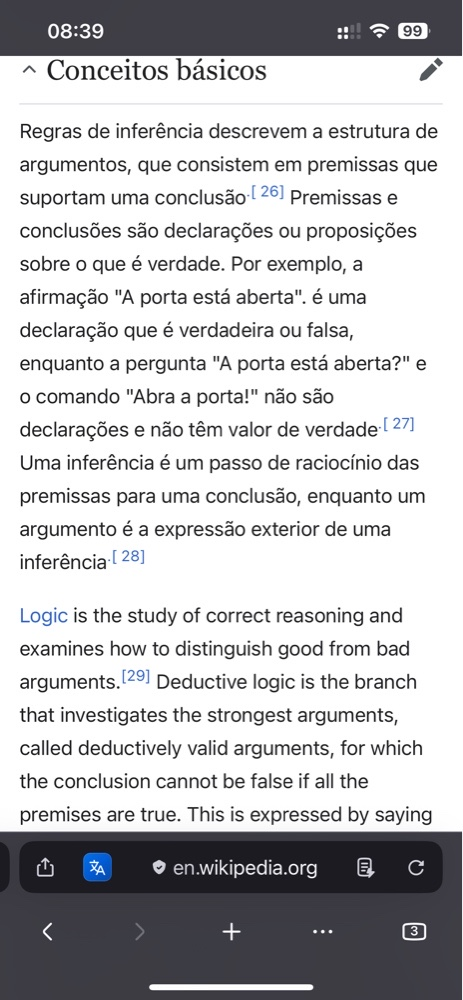
When using the native translation tool in Firefox for iOS to translate an English page (specifically tested on Wikipedia) into Portuguese, the translation is incomplete and inconsistent.
This behavior mostly occurs inside collapsible sections (the topics that expand and collapse when you tap the arrow icon). The translation failure is not just on a paragraph-by-paragraph basis; it often occurs partially within the same section, where some sentences are successfully translated while others right next to them remain entirely in English.
Ios 18.7.8(22H352) Firefox 152.4(74210)
Steps to reproduce:
Open Firefox on iOS.
Navigate to an English Wikipedia article (mobile view, which uses collapsible sections).
Trigger the built-in Firefox translator to translate the page to Portuguese.
Expand one of the sections using the dropdown arrow.
Expected result:
The entire text, including all sentences and paragraphs inside the expanded sections, should be fully translated into Portuguese.
Actual result:
A broken, partially translated layout where some sentences/paragraphs are translated, but others immediately below (or within the same block) remain in the original English.
(Note: Please attach your screenshot showing the open section with the arrow and the mix of Portuguese and English text).
All Replies (4)
What is the URL address in this case?
Not sure why the chatbot used the correct bug reporting template, but then sent you here instead of filing the issue in the correct repository (where the template indeed comes from ;D)
I've seen this before, I'll check if it is tracked already and update the ticket for v2 translations now.
(I can see the issue basically where adding content to the visible tree by expanding the sections works the first several times, but then after a while no longer updates when more new content is added. It's usually not tied to some specific content or sections, but the order and timing in which they are expanded.)
For now I don't see mixed languages, just a point when the translation stops (potentially over the content length) — I'll try poking at it for a bit, as I'm pretty sure my older report was for the original v1 translations, and this newer rollout works differently.
Didn't find any earlier report, filed github.com/mozilla-mobile/firefox-ios/issues/35371 now.