Hello all,
I recently (2 days ago) discovered that my Firefox was broken immediately following a Windows 11 update (2026-01 Preview Update (KB5074105) (26200.7705), in case this means anything to anyone). I first noticed my bookmarks and browsing history were gone (which I noticed a lot of people have already been complaining about recently). I want to start off by EXPLICITLY saying I have tried restarting Firefox, my computer, and following the instructions from the most commonly linked solutions (1 1, 2 2 , 3 3). None of it has many any difference to speak of. Now, onto the diagnosis.
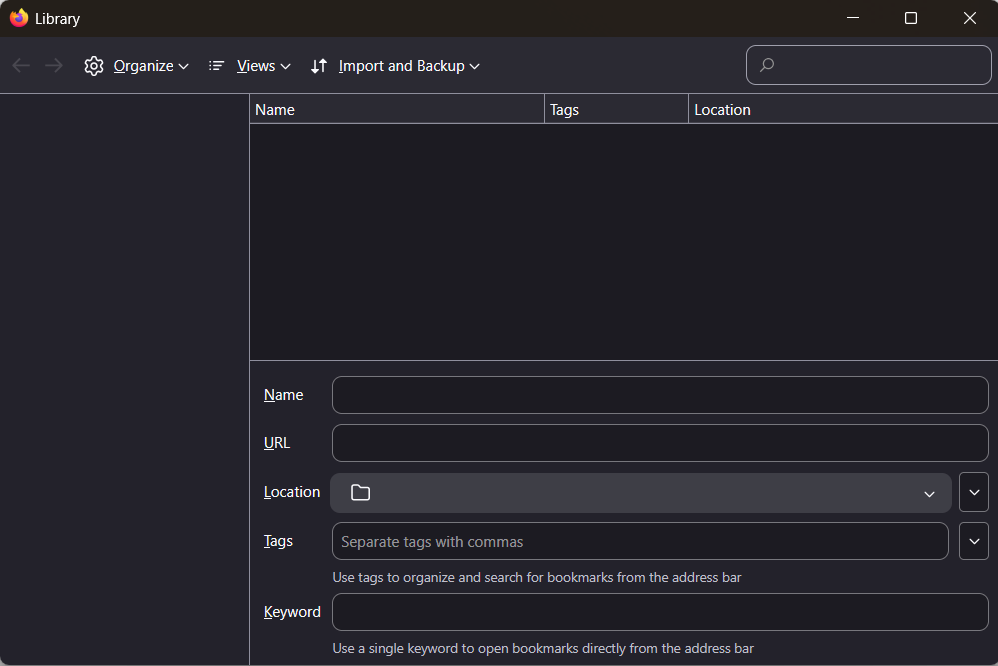
My history is still not being remember or updated. Furthermore, the history management tool (the one that opens up on Ctrl + Shift + O) is completely non-functional. Clicking any button in there does nothing. I have tried to go "Import and Backup -> Restore -> Choose a File", especially because I managed to locate the .jsonlz4 backup files for my bookmarks in the root folder of my (one and only) profile. The history manager does not allow me to open a file, in fact clicking "Choose a File" does not even open a file selection menu. Clicking "Backup" does nothing, clicking "Import Bookmarks from HTML" does nothing. "Views" is also completely empty (which I assume makes sense, given there is no browsing history to speak of).
My only guess is my profile ended up broken somehow? I would guess the Windows update had something to do with it, but the fact that the history is still not being saved 2 days later confuses me greatly. Any help would be much appreciated, thank you in advance.
Hello all,
I recently (2 days ago) discovered that my Firefox was broken immediately following a Windows 11 update (2026-01 Preview Update (KB5074105) (26200.7705), in case this means anything to anyone). I first noticed my bookmarks and browsing history were gone (which I noticed a lot of people have already been complaining about recently). I want to start off by EXPLICITLY saying I have tried restarting Firefox, my computer, and following the instructions from the most commonly linked solutions ([https://support.mozilla.org/en-US/kb/recover-lost-or-missing-bookmarks 1] 1, [https://support.mozilla.org/en-US/kb/back-and-restore-information-firefox-profiles 2] 2 , [https://support.mozilla.org/en-US/kb/restore-bookmarks-passwords-and-data-from-an-old-firefox-profile 3] 3). None of it has many any difference to speak of. Now, onto the diagnosis.
My history is still not being remember or updated. Furthermore, the history management tool (the one that opens up on Ctrl + Shift + O) is completely non-functional. Clicking any button in there does nothing. I have tried to go "Import and Backup -> Restore -> Choose a File", especially because I managed to locate the .jsonlz4 backup files for my bookmarks in the root folder of my (one and only) profile. The history manager does not allow me to open a file, in fact clicking "Choose a File" does not even open a file selection menu. Clicking "Backup" does nothing, clicking "Import Bookmarks from HTML" does nothing. "Views" is also completely empty (which I assume makes sense, given there is no browsing history to speak of).
My only guess is my profile ended up broken somehow? I would guess the Windows update had something to do with it, but the fact that the history is still not being saved 2 days later confuses me greatly. Any help would be much appreciated, thank you in advance.
Attached screenshots