


Remove “Turn on Vertical Tabs” from the context menu

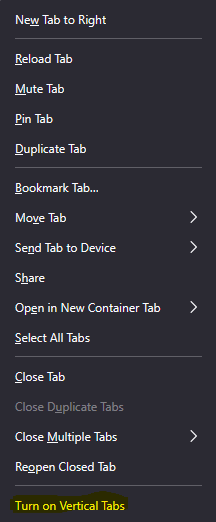
I'm using Firefox Developer Edition v136.0b5, and I'm looking for a way to remove “Turn on Vertical Tabs” from the contextual menu, because I'm so used to reopening a tab by clicking on what was then the last item in the list, that every time I end up with vertical tabs lol.
Chosen solution
Here's the full procedure: 1. Type "about:support" in the address bar 2. Find "Profile Folder" and click the "Open folder" button next to it 3. Create a subfolder named "chrome" 4. Activate "Hiddent Items" in explorer to display file extension 5. Inside "chrome" folder, create a file named userChrome.css (right clic then New > Text document) 6. Edit the file created with any editor (I use Notepad++, which is free). 7. Add this :
 #context_toggleVerticalTabs,
 #tabContextMenu menuseparator:last-of-type {
   display:none !important;
 }
8. Save and restart Firefox. This hide “Turn on Vertical Tabs” and the last separator in the FF context menu. Thanks to TyDraniu for the help 👍
Read this answer in context 👍 2All Replies (4)
Just add this code to your userChrome.css file:
#context_toggleVerticalTabs {
 display:none !important;
}
Chosen Solution
Here's the full procedure: 1. Type "about:support" in the address bar 2. Find "Profile Folder" and click the "Open folder" button next to it 3. Create a subfolder named "chrome" 4. Activate "Hiddent Items" in explorer to display file extension 5. Inside "chrome" folder, create a file named userChrome.css (right clic then New > Text document) 6. Edit the file created with any editor (I use Notepad++, which is free). 7. Add this :
 #context_toggleVerticalTabs,
 #tabContextMenu menuseparator:last-of-type {
   display:none !important;
 }
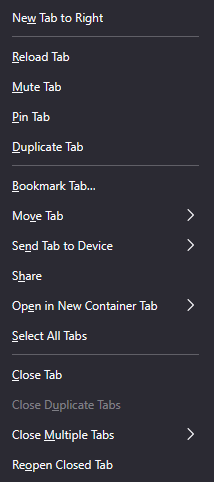
8. Save and restart Firefox. This hide “Turn on Vertical Tabs” and the last separator in the FF context menu. Thanks to TyDraniu for the help 👍
Modified by DragoWeb
Result (I clicked "Quote" instead of "Edit post" and now IDK how to delete this post 😅)
Modified by DragoWeb
Please be informed that after some testing this menu item is going to be removed soon.