


"New Message" button gone

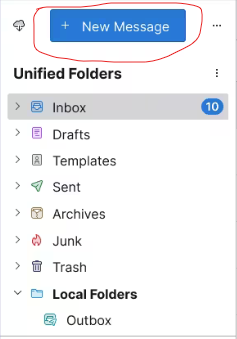
Somehow I managed to remove the "New message" button above my email address. How do I get it back? I have tried looking through the toolbars, but so far nothing is working.
Does anyone have any ideas?
Thank you!
Somehow I managed to remove the "New message" button above my email address. How do I get it back? I have tried looking through the toolbars, but so far nothing is working.
Does anyone have any ideas?
Thank you!
Chosen solution
View/Folders/Folder Pane Header.
Read this answer in context 👍 6All Replies (3)

Sorry. You're on a phone. My answer was no help!
Good Luck!
Modified by Chicks_Hate_Me
I don't think that worked. Maybe this picture will help a bit more. The button circled in red is the one that I accidentally got rid of. From what I remember, I clicked on the three dots next to it and accidentally selected some option that caused it to go away.
Chosen Solution
View/Folders/Folder Pane Header.