


I just need to find my grouped tabs while using verticle tab mode...

I just need to find my grouped tabs while using verticle tab mode...
Normally when the tabs are horizontal there is a drop down arrow.
Switch it to verticle, andf no matter where any AI has told me to click and look for them the answers have been wrong, and when searching the support center directed me to a bunch of useless articles, the top one was literally "Use AI group naming for your tabs" or w/e.
Please tell me this is a thing, or honestly Ill go back to Chrome. They've got everything on me by now anyways.
All Replies (5)
You're looking for Tab overview menu — that has different icons based on the features or actual device you use (so if you don't see the "chevron", it will be "stacked boxes" in vertical layout) — starting with v160 this will be unified to a "tab search" icon for everyone.
Chosen Solution
crustpunchstudios said
Please tell me this is a thing, or honestly Ill go back to Chrome. They've got everything on me by now anyways.
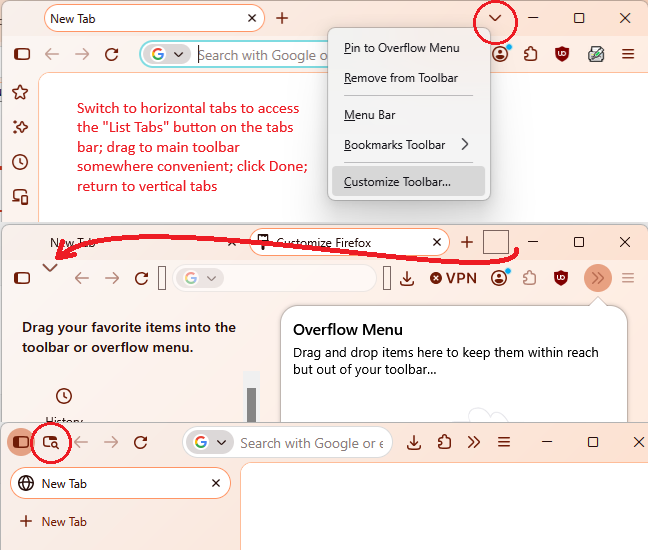
When you switch to vertical tabs, the top tab bar is hidden. So the button there becomes inaccessible. I'm not sure what the plan is for the future, but for now, you need to manually move that button to an accessible location yourself. As an example, you could place it on the main toolbar next to the sidebar button. Example screenshot composite attached, and see: Customize Firefox controls, buttons and toolbars.
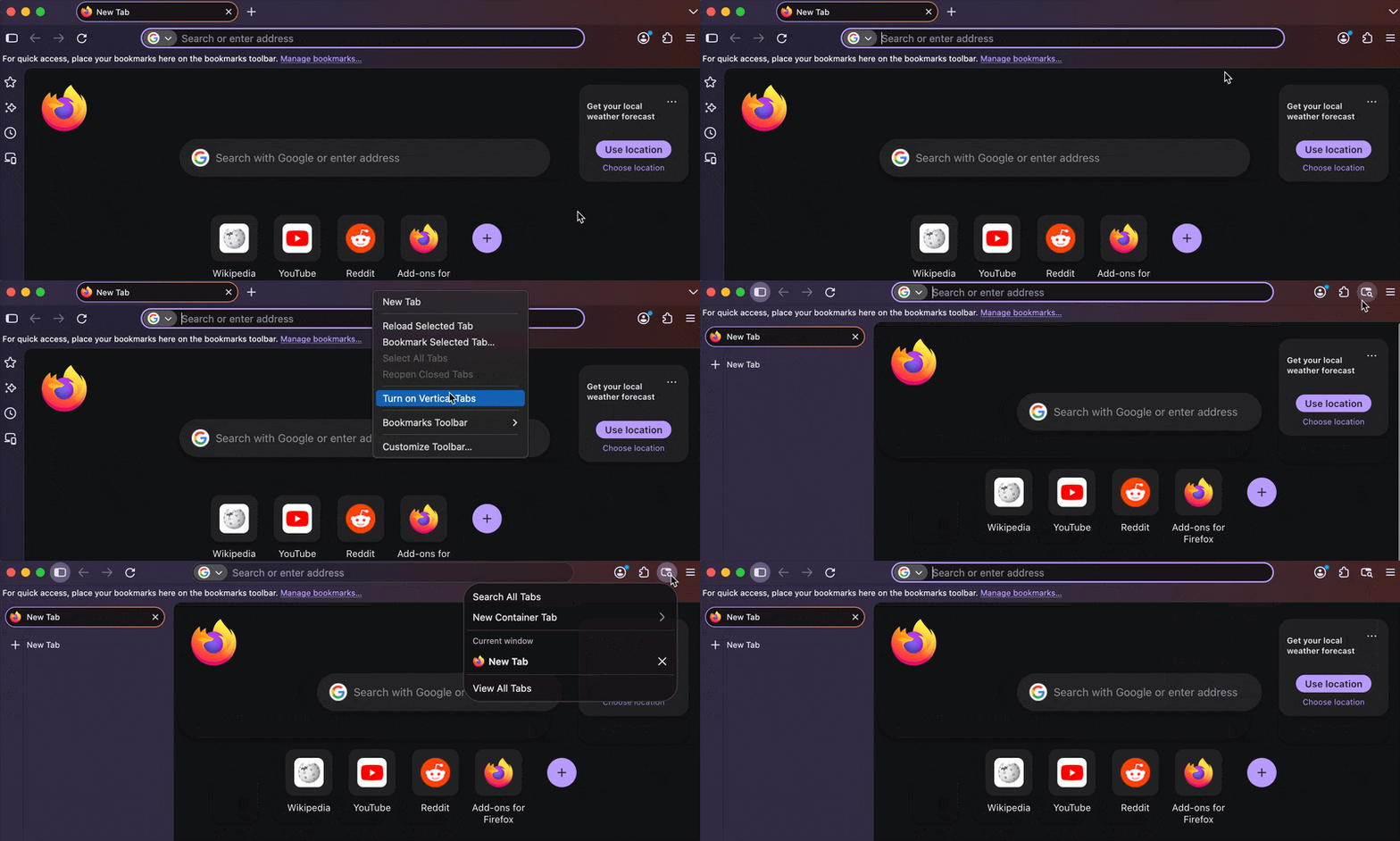
Might be worth a bug if that gets lost somewhere among the toolbars and overflow buttons (or in specific window sizes) — in general in a clean profile it just moves like this:
Hi jbr, thank you for the recording. I didn't notice it there.
jscher2000 - Support Volunteer said
crustpunchstudios said
Please tell me this is a thing, or honestly Ill go back to Chrome. They've got everything on me by now anyways.When you switch to vertical tabs, the top tab bar is hidden. So the button there becomes inaccessible. I'm not sure what the plan is for the future, but for now, you need to manually move that button to an accessible location yourself. As an example, you could place it on the main toolbar next to the sidebar button. Example screenshot composite attached, and see: Customize Firefox controls, buttons and toolbars.
Thank you so much! I feel like this needs to be linked into verticle tab articles.