


FF tabs disappeared and disappear every time I restart FF, despite settings to stay open.

Two days ago I closed FF and went to bed. I opened it the next morning and lost about 20 tabs. Ever since then, every time I restart FF, I lose all tabs except for one default tab.
TLDR: 1. "restore previous session" is not available. 2. Toggling Settings/Home and Startup does nothing. 3. Update? My FF automatically updates. 4. "about:sessionrestore" finds nothing,
1. FF help said I could go into History and click "Restore Previous Session" but that option doesn't exist. All I can do is look at History and see lists for today, yesterday, last 7 days etc.
2. Another advisory suggested Settings, Home and Startup, select "Open previous windows and tabs". but it was already selected. So I switched it off, restarted FF and then switched it back on. I still lose all tabs every time I restart FF.
3. Another advisory suggested, checking for updates. My FF automatically updates.
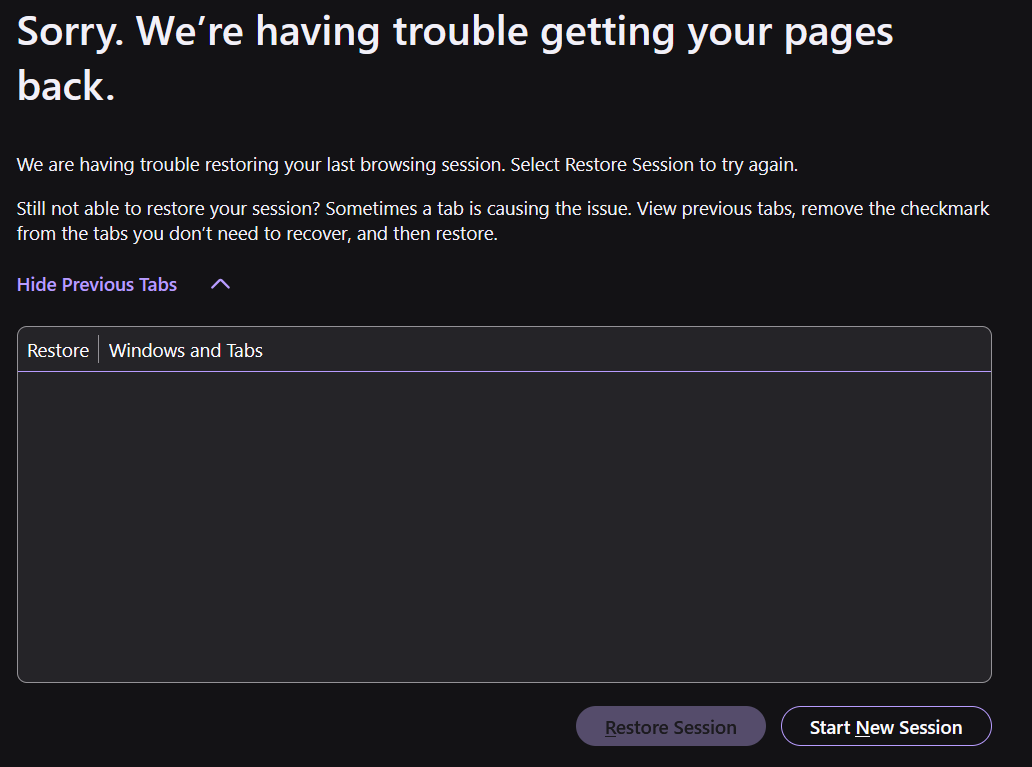
4. I tried "about:sessionrestore" It returns with the heading: "Sorry. We’re having trouble getting your pages back." Restore session is greyed out and "View previous tabs" produces an empty list. I've tried it a few times now, identical result.
Thanks for any help. Cheers, Andrew
All Replies (12)
Hi,
A couple of questions:
- Does the issue persist after a device restart?
- Do you have several Firefox windows open?
- After you close Firefox, are there any Firefox processes left in the Windows Task Manager?
Chosen Solution
Thanks Denys,
To your questions in order...
1. After your question, I closed all open windows then restarted Windows. When I restarted Firefox, the 6 tabs I had open were all there. smh. I should have remembered the old "restart Windows" rule. I usually restart Windows about once a week, but I had not at the time this issue happened.
2. I sometimes have "Private Browsing" open, but I didn't when this issue first happened. And I never have separate panes open. They're always in tabs.
3. I should have checked processes before restarting Windows. But having checked after the restart, running Firefox and closing it again - there are no processes left. I have seen Firefox processes lagging previously, but not recently.
Thanks again
Considering your issue is resolved, I'll mark your reply above as a solution.
To elaborate on windows/processes advice: The proper way to close Firefox is via the Firefox menu > Exit (or Ctrl+Shift+Q). If you close a Firefox window, the browser treats this just as a window closure, unless it's the last open window. Closed windows are not restored, so if you have several Firefox windows open, you should exit Firefox as described previously instead of closing them one by one. (This applies only to regular, non-private windows.) If for some reason a Firefox process is left with no window visible, it may still be treated as an open window (causing tab loss). However, even when the above is the case, you should be able to restore your tabs via History > Recently closed windows.
Just a quick response, Denys,
I never open other windows, only new tabs. When closing Firefox, I have always used the X at the top far right. This has never resulted in tabs disappearing.
Are you saying I should not use that top far right X, and only use the menu or ctrl-shift-Q?
Thanks again, Andrew
Modified by Andrew
If you only have a single window, the cross is also fine

I think this is a bug with the: Open Firefox automatically when your computer starts up.
Ever since I've turned on this option, I've had this happen twice and under History I can't even retrieve Recently Closed Windows(usually it's available for me if I accidentally happen to close my main window when I have 2 instances of FireFox opened).
Recently I just used my laptop to play on something and I never interacted with the Opened Firefox(opened from startup). Maybe not interacting with it when it's automatically opened causes the issue?
Hi K-Choi,
I never use "open automatically when windows starts" with any program. I'm obsessive about that. lol.
I think my FF had an undefined glitch, but that wasn't it.
Nice thought though.
I'm on a Mac and I had this same problem a while ago. I thought I had fixed it and it worked several times. Today, a new version of FF came out and was automatically installed. When FF reopened..... poof!..... everything was gone. I tried History > Restore Previous Session, but that was grayed out. Any thoughts from anyone?
Modified by Jim Kaufman
Jim Kaufman said
Today, a new version of FF came out and was automatically installed. When FF reopened..... poof! everything was gone. I tried History > Restore Previous Session, but that was grayed out. Any thoughts from anyone?
Hi Jim, could you check for closed windows using either:
- "3-bar" menu button > History > Recently Closed Windows
- menu bar > History > Recently Closed Windows
Can you recovery any missing tabs from closed windows?
IGNORE THIS POST. See next post.
Modified by Jim Kaufman
jscher2000 - Support Volunteer said
Jim Kaufman said
Today, a new version of FF came out and was automatically installed. When FF reopened..... poof! everything was gone. I tried History > Restore Previous Session, but that was grayed out. Any thoughts from anyone?Hi Jim, could you check for closed windows using either:
- "3-bar" menu button > History > Recently Closed Windows
- menu bar > History > Recently Closed Windows
Can you recovery any missing tabs from closed windows?
jscher2000,
YES! menu bar > History > Recently Closed Windows worked! I tried that and five previously closed windows opened up. I was able to go through the open tabs in each window and identify the window that existed just before the FF update/restart. I'm cooking with gas now....
For future reference, do you have any idea what I'm doing wrong, or is this just a FF "feature?"
Also, when one closes a window and gets the "Close XX tabs?" message, does this mean FF will close the tabs and NOT capture them in "Restore Previous Session?" I always thought this was just an advisory message and that FF would still capture everything in "Restore Previous Session." Here's how I have FF Settings set up:
- Home and Startup > Open previous windows and tabs (Checked)
- Privacy and Security > History> Remember history (UNchecked) - Privacy and Security > History> Customize history (Checked) - Privacy and Security > History> Customize history > Choose what you want FF to remember > Advanced settings > Always use private browsing mode (UNchecked) - Privacy and Security > History> Customize history > Choose what you want FF to remember > Advanced settings > Remember browsing and download history (Checked) - Privacy and Security > History> Customize history > Choose what you want FF to remember > Advanced settings > Remember search and form history (Checked) - Privacy and Security > History> Customize history > Choose what you want FF to remember > Clear history when FF closes (UNchecked) - Privacy and Security > History> Customize history > Choose what you want FF to remember > Clear history when FF closes (UNchecked) - Privacy and Security > History> Never remember history (Checked)
- Tabs and browsing > Tabs > Closing > Ask before closing multiple tabs (Checked) - Tabs and browsing > Tabs > Closing > Ask before quitting with ⌘Q (UNchecked)
Thanks in advance for any insight you might be able to offer!
Jim Kaufman said
For future reference, do you have any idea what I'm doing wrong, or is this just a FF "feature?"
That's hard to say without watching over your shoulder, but since you mentioned closing a window, I think everyone who posts here regularly will say: when you are done with Firefox, please quit using the menu (without closing windows you want to use in the future). Either:
- main toolbar > menu button > Quit
- top menu bar > Firefox menu > Quit
The reason for doing that is Firefox on MacOS continues running after you close the last window. Your session does not end, so session restore isn't available until Firefox is somehow terminated. Then when Firefox is restored, there's only a new window visible and the other windows need to be recovered from Recently Closed Windows.
Also, when one closes a window and gets the "Close XX tabs?" message, does this mean FF will close the tabs and NOT capture them in "Restore Previous Session?" I always thought this was just an advisory message and that FF would still capture everything in "Restore Previous Session."
Yes, those tabs should all exist in the closed window.
Here's how I have FF Settings set up: - Home and Startup > Open previous windows and tabs (Checked) - Privacy and Security > History> Remember history (UNchecked) - Privacy and Security > History> Customize history (Checked) - Privacy and Security > History> Customize history > Choose what you want FF to remember > Advanced settings > Always use private browsing mode (UNchecked) - Privacy and Security > History> Customize history > Choose what you want FF to remember > Advanced settings > Remember browsing and download history (Checked) - Privacy and Security > History> Customize history > Choose what you want FF to remember > Advanced settings > Remember search and form history (Checked) - Privacy and Security > History> Customize history > Choose what you want FF to remember > Clear history when FF closes (UNchecked) - Privacy and Security > History> Customize history > Choose what you want FF to remember > Clear history when FF closes (UNchecked) - Privacy and Security > History> Never remember history (Checked) - Tabs and browsing > Tabs > Closing > Ask before closing multiple tabs (Checked) - Tabs and browsing > Tabs > Closing > Ask before quitting with ⌘Q (UNchecked)
The bolded one I assume is UNchecked, so that's all good.