


Why is Firefox used so much RAM workload since a week?

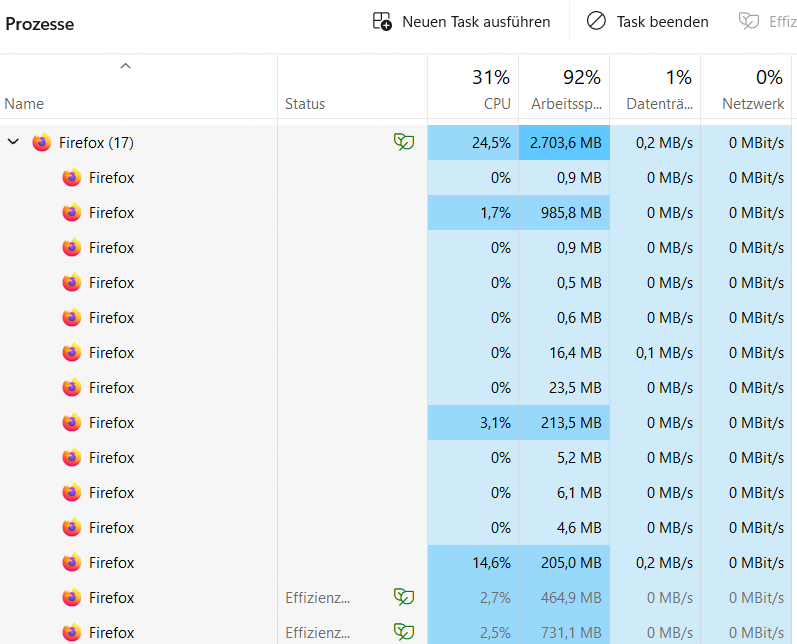
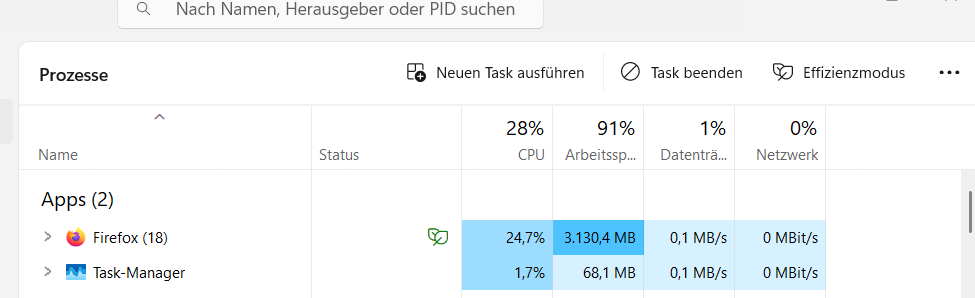
Hey there since a week when I brows with Firefox on Windows desktop the RAM uses jumped from around 60% spiked to 92-95% RAM and that changed just come a long a week ago. If change brows like Chrome different story, back down at 65. So you can also see a massive number on Firefox system running.
Question: Whats the reason for the change? What happend?
Best, Janosch
All Replies (2)
Hello,
Try disabling graphics hardware acceleration in Firefox. Since this feature was added to Firefox, it has gradually improved, but there are still a few glitches.
You will need to restart Firefox for this to take effect so save all work first (e.g., mail you are composing, online documents you're editing, etc.) and then perform these steps:
- Click the menu button
 and select Settings.
- Select the General panel.
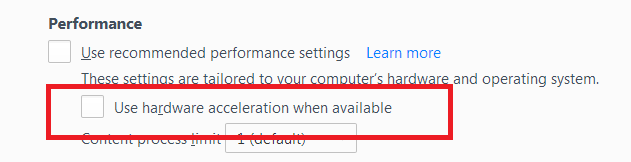
- Under Performance, uncheck Use recommended performance settings. Additional settings will be displayed.
- Uncheck Use hardware acceleration when available.
- Close Firefox completely and then restart it to see if the problem persists.
Did this fix your problems? Please report back to us!
If the problem is resolved, you should check for updates for your graphics driver by following the steps mentioned in these Knowledge base articles:
- Troubleshoot extensions, themes and hardware acceleration issues to solve common Firefox problems
- Upgrade your graphics drivers to use hardware acceleration and WebGL
Thank you.
Hey Phantom,
thank for your reply. I appreciate. I´ve switched it off the hardware like you showed in the settings, and is still off. So, I kept close tabs on the RAM usage rate. The Ventilation still jumps on and the rate is just below 85% drain the battery on my laptop pretty rapid and leads to limitation of flexibility and chareing. Again, that appears just with Firefox not with Chrome or Bing or Safari. Just appears one week ago, that that issue came up.
Any idea? Any idea how I could provide you with more information? Best, Janosch
