


Firefox isn't displaying the text correctly in the pdf

Characters from the Hindi language are not being shown correctly in the PDF at https://rajeduboard.rajasthan.gov.in/.../SS-01-Hindi-C.pdf. I tried a page encoding addon, but that also doesn't seem to help.

All Replies (7)
Hi, for me it looks completely the same in Adobe Reader. Do you have any software that render it correctly?
TyDraniu said
Hi, for me it looks completely the same in Adobe Reader. Do you have any software that render it correctly?
idk but searching the text in google ends up with such similar valid pdf's

Looks like someone created a bad pdf. I see the same issue in Firefox and Chrome. see screenshots The same doc in English looks fine. https://rajeduboard.rajasthan.gov.in/books/PAPERS-2019/
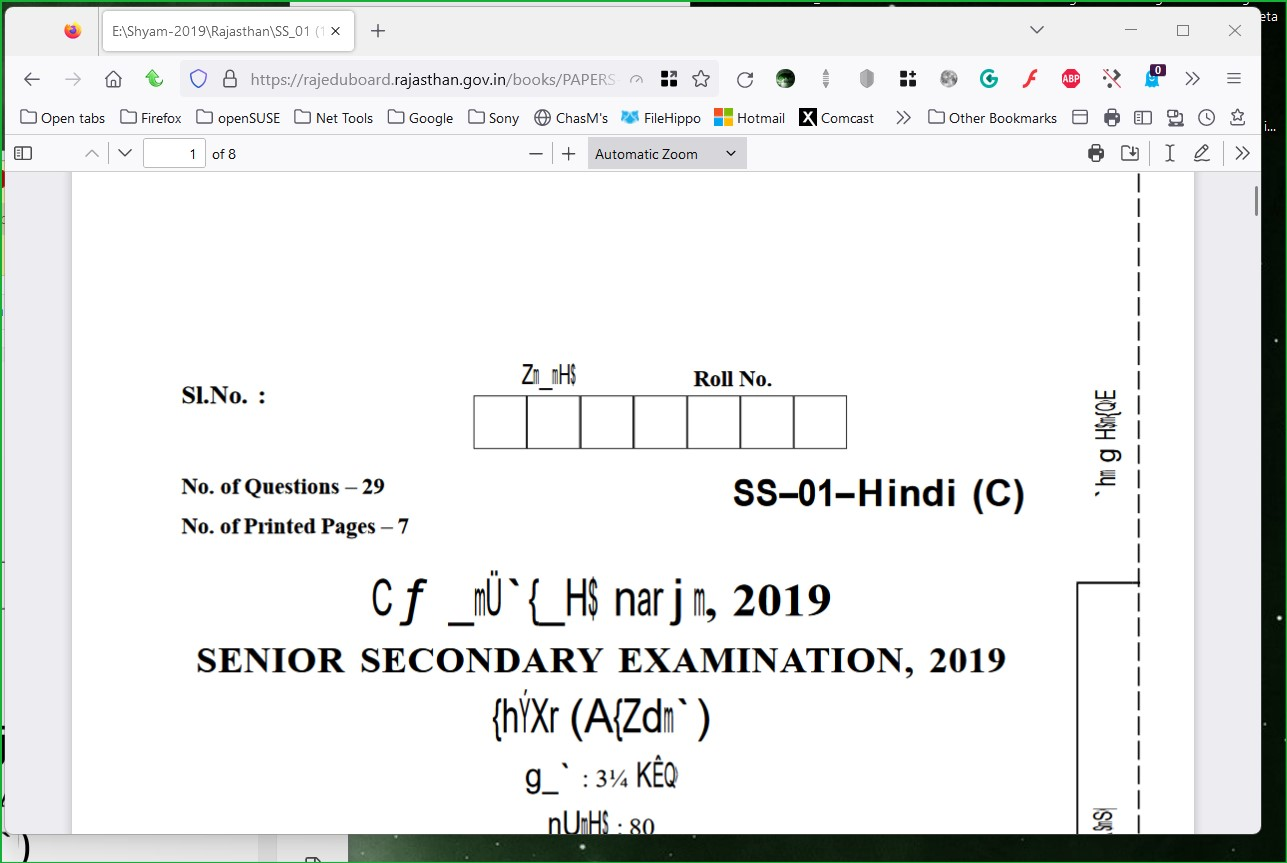


Hindi looks fine. see screenshot Here is another bad pdf from the same site. see screenshot https://rajeduboard.rajasthan.gov.in/books/PAPERS-2019/Upd/VU-01-Hindi-C.pdf I see the same issue downloading the file and opening in adobe. see screenshot There's an issue on the site for pdfs with Hindi-C. Doesn't appear to be a browser issue.


Modified by jonzn4SUSE
The not working file show this as the PDF Producer:
- doPDF Ver 6.3 Build 309 (Windows Vista x64)
The English version has PDF Producer:
- Microsoft: Print To PDF
Another pair where Hindi fails and English is OK from V UPADHYAY 2019 .

Only the creator of the PDF can fix the issue and update the pdf to correct errors.