


I want to disable add ons only in Firefox Developer Edition, how?

Hello users,
I use Firefox a very long time and I love it. A few days ago I downloaded Firefox Developer Edition and I use it with the same sync email address, because of bookmarks, passwords and more. But I don't want to use add-ons in Firefox Developer Edition... How can I disable add-ons in developer edition, while add-ons stays enabled in Firefox version? If I use command-line "-safe-mode", I get every time a message about safe-mode before Firefox Developer Edition starts.
I hope you have a smart solution for me.
All Replies (2)
Chosen Solution
Would it work to adjust your Sync settings on Developer Edition to not sync Extensions? That is on the Options (about:preferences) page:

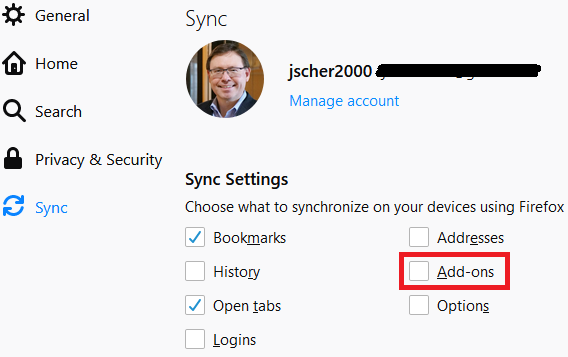
jscher2000,
Oops, lol (facepalm) to myself... Thank you very much!!!!
Update: I also see this option unchecked in Firefox. But I think I can live with it.
Modified by Dark Angel