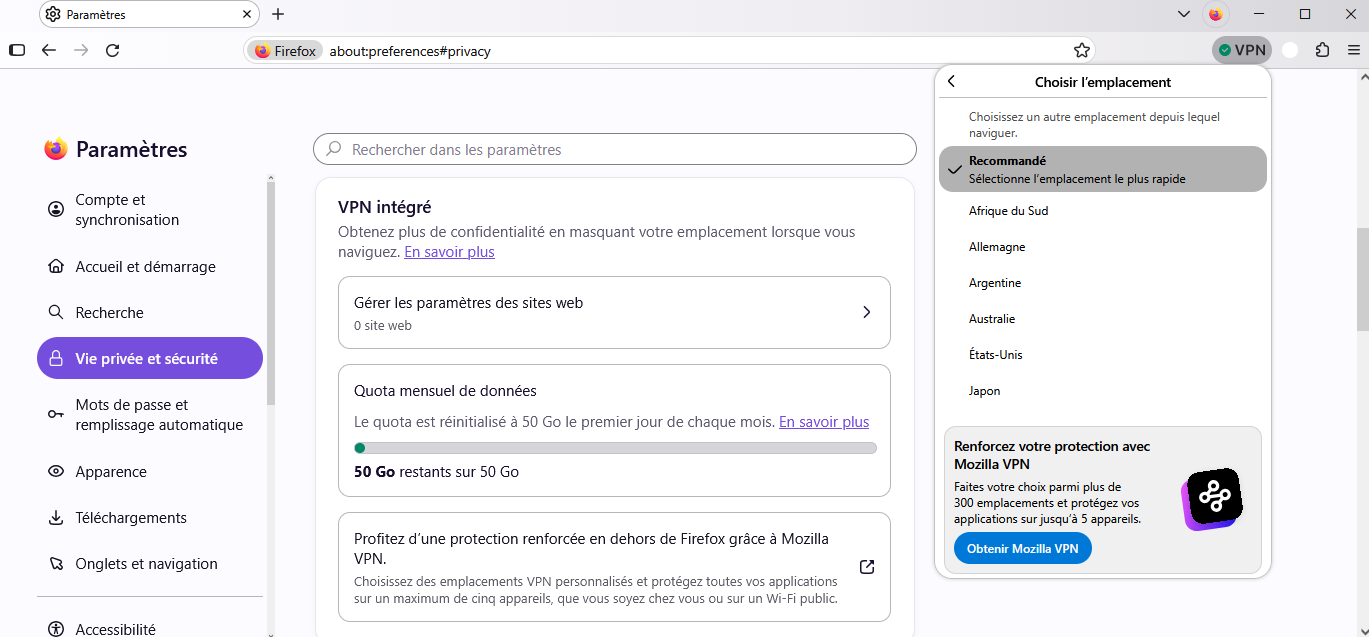
Firefox VPN 50 GB Monthly Free Data Not Available on Windows

Hello Firefox Support Team,
I am using the same Mozilla account on both my smartphone and my Windows laptop.
On my smartphone, I can successfully access and use the free 50 GB monthly VPN allowance. However, when I sign in to the same Mozilla account on my Windows laptop, this feature is not available.
I would like to know why this feature works on my smartphone but is unavailable on my Windows device, even though I am using the same account on both devices.
Could you please help me resolve this issue and enable the free 50 GB monthly VPN allowance on my Windows laptop as well?
Thank you for your time and support.
Best regards
All Replies (1)
Bonjour
Use built-in VPN in Firefox https://support.mozilla.org/en-US/kb/built-in-vpn
Unable to find the built-in VPN in Firefox https://support.mozilla.org/en-US/kb/unable-find-built-vpn-firefox
Otherwise, please, check, the preference, browser.ipProtection.enabled https://support.mozilla.org/en-US/questions/1578173
To complement, see also this discussion thread https://support.mozilla.org/en-US/questions/1605682
Je vis en France Utiliser le VPN intégré à Firefox https://support.mozilla.org/fr/kb/vpn-integre