


website fonts become unreadable over the course of the day without exiting all pages and restarting

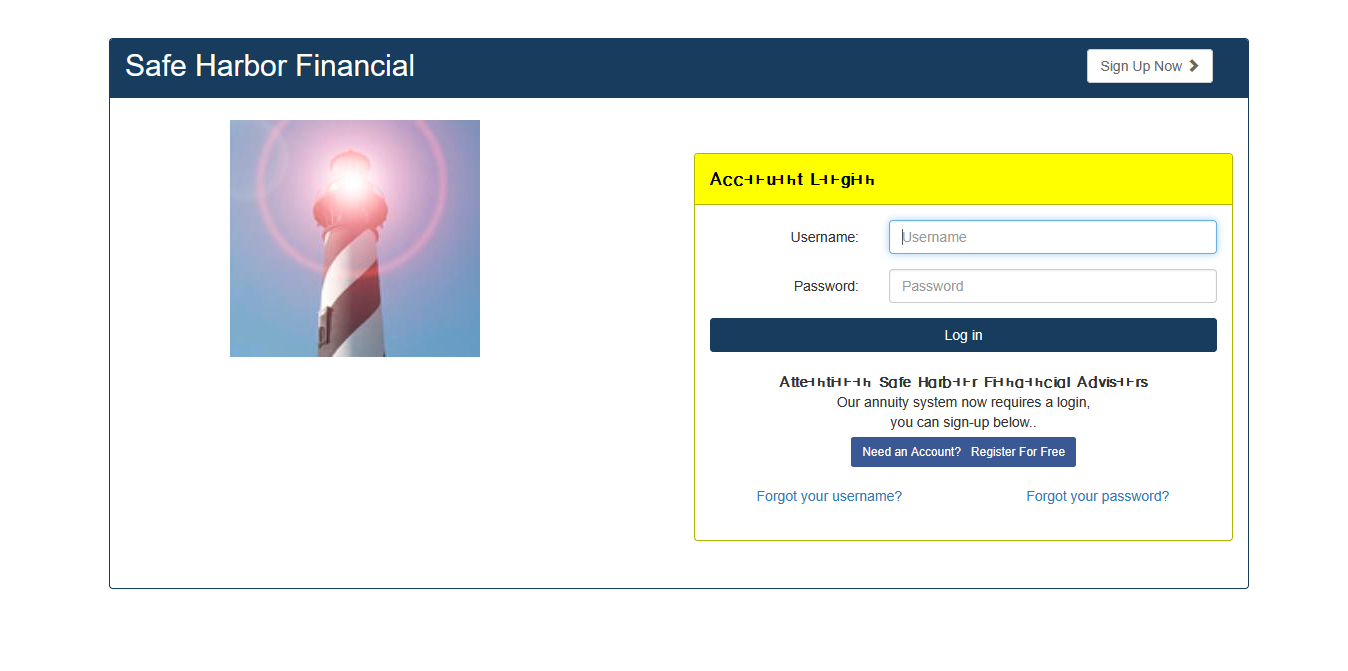
When I start Firefox in the morning, I normally have multiples pages open, which I need for work. Over the course of the day, the websites become unreadable in terms of the fonts and even new pages I cannot see all of the fonts. I have attached a image from a new website I loaded and if you look above username and below log in you will see messed up fonts that are unreadable. They even print that way. I have to exit all pages and restart Firefox to make it go away. It is a pain to have to do that and re-log into all the sites I need open during the day. This has happened for about a year. I update it all the time and it never fixes it. I have a desktop computer. I have windows 11 professional. I have all updates to windows and all updates to programs in Microsoft Store. I have Firefox 152.0.6 (64-bit). I have reported this before but go not useful information from the report I put on here.
Ezalaki modifié na hhts1
All Replies (6)
Does it also happen if you start Troubleshoot Mode (from Help menu) and browse using that for a bit?
I normally use a private window each time, but I can try troubleshoot mode and see what happens. It will take time to see if it fixes it. Today's work day is almost over and I do not work on Wednesday. I will try it tomorrow though.
The most relevant from its conservative settings probably would be disabling HW acceleration — so you can probably mimic that also just by creating a separate testing profile, disabling performance optimizations in that one, and use it and its private browsing for a while to see how a "clean slate" would fare in this case.
It happens in private mode or regular mode. I normally only use private mode, due to the fact it fixes other issues. I have not tried troubleshooting mode. I can try troubleshooting mode and try HW Acceleration, but any idea why it happens in the first place?
I am not sure how to disable performance optimizations. I looked in settings but don't see it.
The article Use Troubleshoot Mode in Firefox has the details for both.