


IMAP connection times out

Couple months back had to restore computer. Wouldn't let me add my POP gmail account, said had to use IMAP. POP was no longer accepted or something to that effect. So I got IMAP set up. (Of course, I did save my old POP folder with some messages in it.) Ever since setting up the IMAP folder I only get maybe 30 messages each morning. Never more. Which is no way right. I've googled and tweeked the synchronization/storage settings and the server settings. Nothing works. I'll spend hours googling suggestions and trying them, then get frustrated and move on. Then a week or so later I go thru it all again. Nothing changes!! Still only get the very few emails each morning. About 30 or so minutes after the initial download of messages, I'll get a pop up saying imap connection lost. This is SO frustrating. I have no idea what to try next. I never had this kind of issue with any of my POP accounts. Any suggestions? I've probably already tried them but will certainly give it another try. Thanks! Lynn
All Replies (7)
So this morning I started off with 91 messages in my main inbox. Was watching the bottom bar and it said "downloading 1 of 82". Not sure where the other 81 messages went, but only 1 new one came in. Not in Spam, not showing in webmail either. Does anyone have ANY suggestions for me? Thanks! Lynn
re Couple months back had to restore computer.
Did you locate a 'windows.old' folder in the C:drive ? It would have stored all your original thunderbird profile data.
re : I did save my old POP folder with some messages in it
Save it where ? If you want to view all those old pop emails - are they visible in the 'Local Folders' mail account ?
I'm assuming you had to reinstall Thunderbird program. did you get the download/install from the official thunderbird download website : https://www.thunderbird.net/en-US/thunderbird/all/ OR did you get Thunderbird from the 'Windows App Store' ? That option presents a load of issues as MS decide to store profiles in a completely different location.
re : I've googled and tweeked the synchronization/storage settings and the server settings.
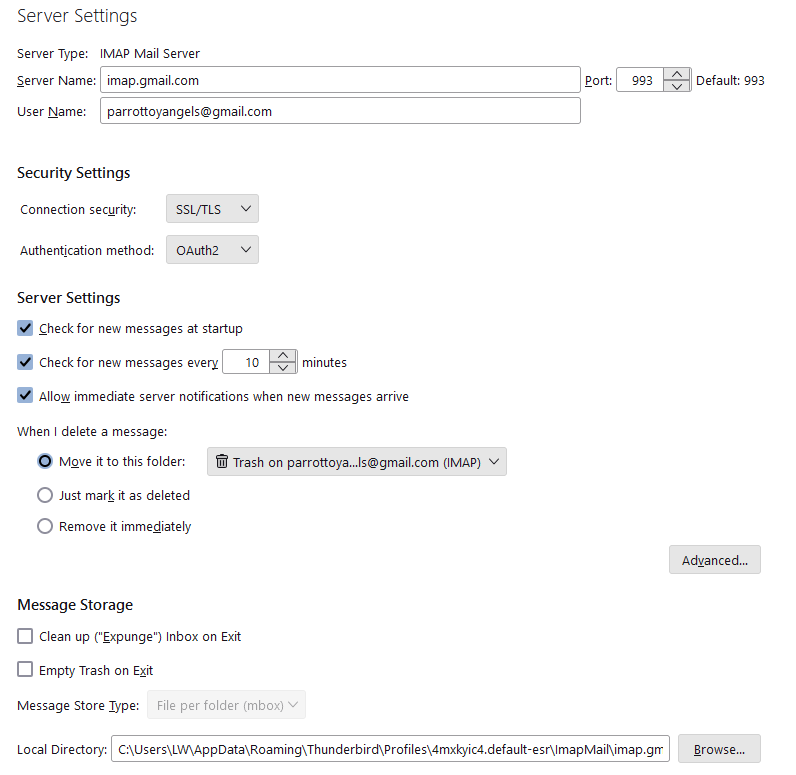
I would need to know what you have now set up in that area. . Account Settings > Server SEttings Post images - you should not have needed to do anything, so it's important o understand the current set up.
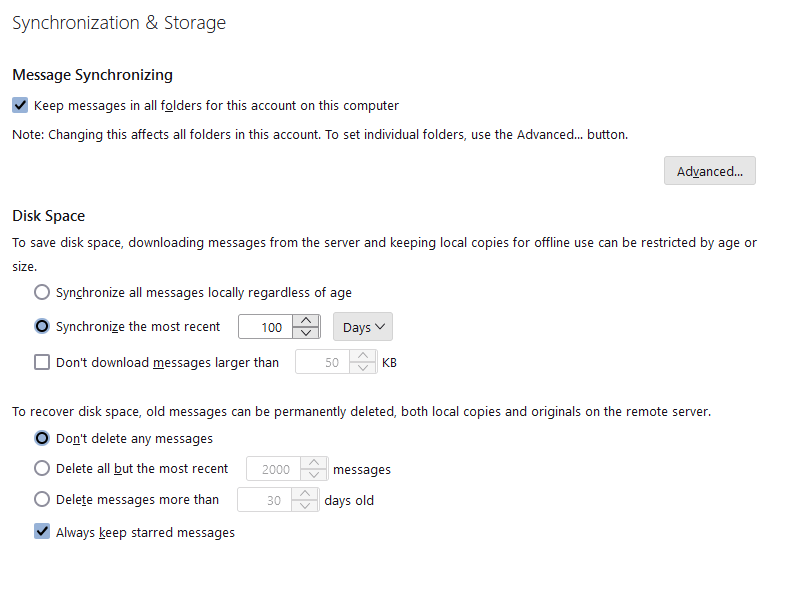
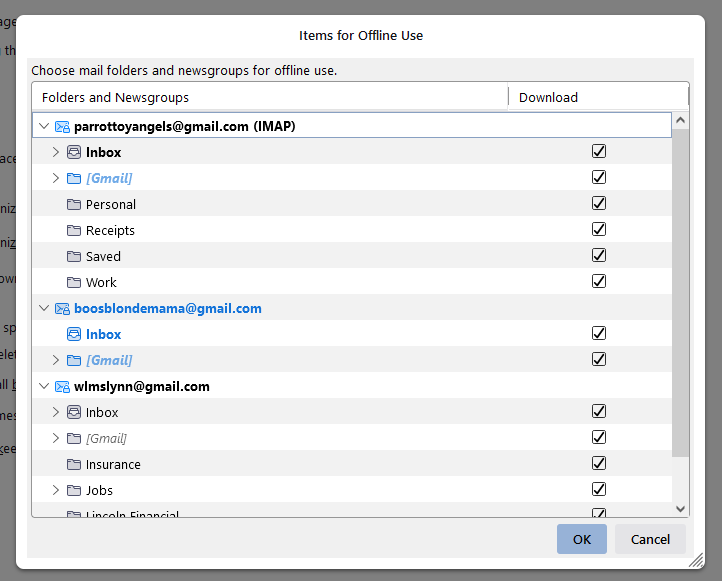
Account Settings > Synchronisation & Storage Upload some images of the 'Synchronisation & Storage' settings. Also tell me - click 'Advanced' button - have you selected all the folders and subfolders ? Post image.
Imap account folders can only display whatever is on the server. Using a browser like Firefox - Logon to the gmail webmail account and tell me how many emails are in the 'Inbox'. Do you see exactly the same in the Thunderbird gmail imap Inbox folder ? Does the webmail Inbox label contents look identical to the Imap Inbox folder contents? Check all the other folders...Whatever you see in the webmail account labels, you should see identical in the Imap account folders of same name. Is this true?
Ezalaki modifié na Toad-Hall
Toad-Hall said
re Couple months back had to restore computer. Did you locate a 'windows.old' folder in the C:drive ? It would have stored all your original thunderbird profile data. No, my computer guy had cloned my system and that's what we restored from. re : I did save my old POP folder with some messages in it Save it where ? If you want to view all those old pop emails - are they visible in the 'Local Folders' mail account ? Yes, I can view them. I simply saved the parrottoyangels@gmail Inbox and moved it to the bottom. I did that because TB / Gmail were not allowing a POP acct. Had to be IMAP. So my new pta@gmail.com Inbox was named pta@gmail.com IMAP I'm assuming you had to reinstall Thunderbird program. did you get the download/install from the official thunderbird download website : https://www.thunderbird.net/en-US/thunderbird/all/ OR did you get Thunderbird from the 'Windows App Store' ? That option presents a load of issues as MS decide to store profiles in a completely different location. Neither, it came from the clone that had been made of my HD re : I've googled and tweeked the synchronization/storage settings and the server settings. I would need to know what you have now set up in that area. . Account Settings > Server SEttings Post images - you should not have needed to do anything, so it's important o understand the current set up. I did have to originally make changes in the account because I moved from POP. So I'm guessing an option is wrong. That folder has been like this since the change to IMAP. I did have to play around with the settings. Originally over 5k emails came rolling in when I first set it up. UGH! Account Settings > Synchronisation & Storage Upload some images of the 'Synchronisation & Storage' settings. Also tell me - click 'Advanced' button - have you selected all the folders and subfolders ? Post image. "Server settings, sync and advanced photos attached" Imap account folders can only display whatever is on the server. Using a browser like Firefox - Logon to the gmail webmail account and tell me how many emails are in the 'Inbox'. Do you see exactly the same in the Thunderbird gmail imap Inbox folder ? Does the webmail Inbox label contents look identical to the Imap Inbox folder contents? Check all the other folders...Whatever you see in the webmail account labels, you should see identical in the Imap account folders of same name. Is this true?
"Yes, 99 in webmail and in TB, everything in both is the same. Been monitoring that the past few weeks. " Thanks!
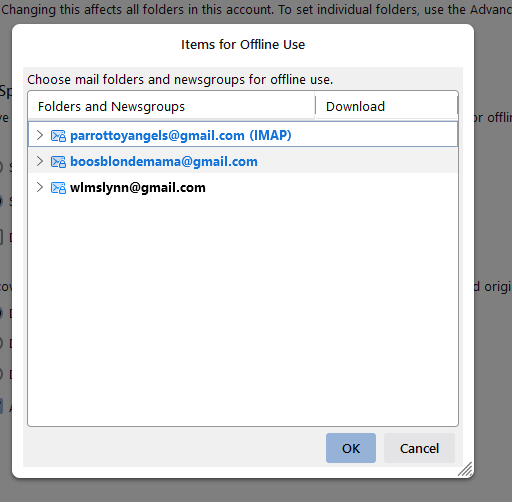
You clicked on 'Advanced'...The last image just showed the names of the various accounts, it did not show what folder names had been selected within the relevant gmail account.
Any folder name selected would be set up to download full copies of emails. Any folder not selected would only download headers.
re : 'synchronise the most recent 100 days' What does this mean....for any folder you selected in the 'Advanced' area, it will download full copies for the last 100 days, all other emails in same folder will only download headers. Full copies of downloaded emails are stored in an mbox text file one after the other. So Inbox mbox file had many emails written to same file one after the other. If you only have headers downloaded, they are not stored in the mbox file.
This is an option usually used by people who have a limited storage space. As each day passes new mail is fully downloaded to mbox files and older previously fully downloaded mail get 'marked as deleted' ready to be removed from mbox file, so only headers are kept. It requires maintenance to maintain that 100 days of fully downloaded copies. You would need to compact folders at the end of each day in order to remove the 'marked as deleted' and clean up the mbox file.
If you are not concerned about limiting storage and want full copies of all emails, then in 'Advanced' you must select all the folders - although it's probably not worth selecting 'Spam' and 'All Mail' (I would advise not subscribing to see 'All Mail'). You also need to select 'Synchronise all messages locally regardless of age'
Any emails that only download headers can still be accessed but when selected the server needs to be contacted and the email then gets downloaded to a temp file to faciliate viewing.
re :I simply saved the parrottoyangels@gmail Inbox and moved it to the bottom. Do you mean it's a now a folder (not an account) within the 'Local Folders' account ? if yes, that's ok. Can you please post an image showing the Folder Pane, so I see where that Inbox is located.
re:"Yes, 99 in webmail and in TB, everything in both is the same. Been monitoring that the past few weeks. "
That means everything is correct.
re : Ever since setting up the IMAP folder I only get maybe 30 messages each morning. Never more. Which is no way right. But, you seem to think emails are missing off server, so obviously cannot be displayed in Imap. You expected more to get downloaded and are wondering why so few.
That's why I'm trying to work out if you have that old Pop account still live and it's connecting to server and downloading emails perhaps even deleting emails off server.
In Account Settings. In left pane, does the original pop account still exist?
Do you have any other computer or email client or phone that connects to that old pop gmail email address?
Ezalaki modifié na Toad-Hall
Toad-Hall said
You clicked on 'Advanced'...The last image just showed the names of the various accounts, it did not show what folder names had been selected within the relevant gmail account. Sorry. All the folders are checked. Pic attached below Any folder name selected would be set up to download full copies of emails. Any folder not selected would only download headers. re : 'synchronise the most recent 100 days' What does this mean....for any folder you selected in the 'Advanced' area, it will download full copies for the last 100 days, all other emails in same folder will only download headers. Full copies of downloaded emails are stored in an mbox text file one after the other. So Inbox mbox file had many emails written to same file one after the other. If you only have headers downloaded, they are not stored in the mbox file. This is an option usually used by people who have a limited storage space. As each day passes new mail is fully downloaded to mbox files and older previously fully downloaded mail get 'marked as deleted' ready to be removed from mbox file, so only headers are kept. It requires maintenance to maintain that 100 days of fully downloaded copies. You would need to compact folders at the end of each day in order to remove the 'marked as deleted' and clean up the mbox file. I found that googling :-( What should I set it to? Should it be sync regardless of age? (Never mind, see you answered that below) If you are not concerned about limiting storage and want full copies of all emails, then in 'Advanced' you must select all the folders - although it's probably not worth selecting 'Spam' and 'All Mail' (I would advise not subscribing to see 'All Mail'). You also need to select 'Synchronise all messages locally regardless of age' Just changed it Any emails that only download headers can still be accessed but when selected the server needs to be contacted and the email then gets downloaded to a temp file to faciliate viewing. Where is this temp file located? re :I simply saved the parrottoyangels@gmail Inbox and moved it to the bottom. Do you mean it's a now a folder (not an account) within the 'Local Folders' account ? if yes, that's ok. Can you please post an image showing the Folder Pane, so I see where that Inbox is located. Pic attached. It's POP and since setting up the IMAP no mail has come in to it re:"Yes, 99 in webmail and in TB, everything in both is the same. Been monitoring that the past few weeks. " That means everything is correct. re : Ever since setting up the IMAP folder I only get maybe 30 messages each morning. Never more. Which is no way right. But, you seem to think emails are missing off server, so obviously cannot be displayed in Imap. You expected more to get downloaded and are wondering why so few. That's why I'm trying to work out if you have that old Pop account still live and it's connecting to server and downloading emails perhaps even deleting emails off server. In Account Settings. In left pane, does the original pop account still exist? Do you have any other computer or email client or phone that connects to that old pop gmail email address?
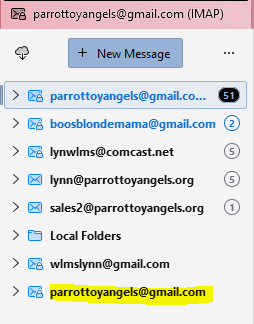
Sorry! I missed the last couple questions!! But, you seem to think emails are missing off server, so obviously cannot be displayed in Imap. You expected more to get downloaded and are wondering why so few.
Yes. Normally before IMAP I was getting 75 - 100 emails in the morning. For my first "email check". Now it's 30 or less.
That's why I'm trying to work out if you have that old Pop account still live and it's connecting to server and downloading emails perhaps even deleting emails off server.
Yes, that POP gmail account would be live I guess, but nothing comes into it since I switched the email address to IMAP. Last email that came into the POP account was 11/25. Nothing since (just checked to make sure).
In Account Settings. In left pane, does the original pop account still exist?
Yes it does. Pic attached
Do you have any other computer or email client or phone that connects to that old pop gmail email address? My phone does. I just checked. But, the message count there is the same as the IMAP acct. I need to go ahead and remove that from my phone anyway. I don't usually have my email come into my phone. The last 20 messages are exactly the same as what's come into IMAP this afternoon
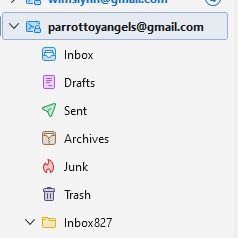
Look at the snips below. See on the POP server the port? Which should it be? I'm pretty sure 993? POP says default 995? If I recall correctly, when I was setting up the IMAP account I had to change the POP to imap.gmail to stop the mail from coming in. IMAP shows port 993. Also, I wonder if it could have something to do with the webmail for that address?

