


TB not recognizing Outlook Personal account as viable SMTP account (evidently)

I get this error ALL THE TIME from TB. Sending of the message failed. The message could not be sent because connecting to Outgoing server (SMTP) smtp-mail.outlook.com failed. The server may be unavailable or is refusing SMTP connections. Please verify that your Outgoing server (SMTP) settings are correct and try again. Copilot says that TB is NOT recognizing my personal Outlook email account as a viable SMTP account. Been on line with Copilot for couple of hours without success. Does anyone at Mozilla have anything to offer me?
All Replies (9)
Just a thought: it is not TB not recognizing the account; it is Microsoft. TB is just the messenger. Posting your SMTP server settings may help. Personally, I use smtp.office365.com, but I know there are different attitudes on that.

I don't use Outlook so I can't compare settings, but here's a Microsoft article that describes their recommended settings. How do they compare with yours?
Those are the settings that Copilot eventually gave me. They are not working with TB.
I've never used outlook.com... until today. I tried setting up a free account just to see what happened. I had much trouble getting past its 'are you human' verifier, but I finally did and got the account opened with them. I have not been able to get Thunderbird to connect - I can get the account seemingly set up correctly, but then I get the error message, "User is authenticated but not connected." I find suggestions on how to fix, including one to disable IPV6 in Thunderbird, but it didn't help me.
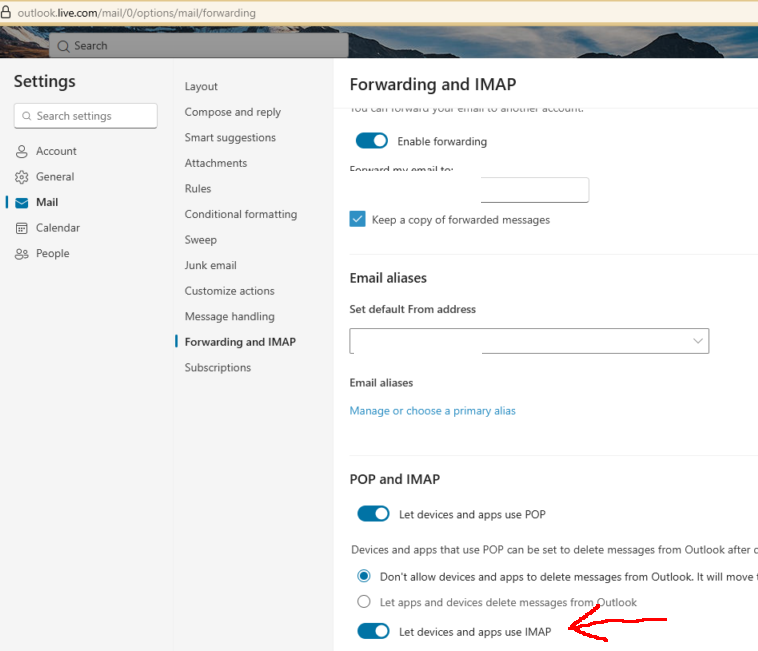
The MS instructions I mentioned above claim that there is a setting at their site that says, "Under POP and IMAP, toggle the slider for Let devices and apps use POP or Let devices and apps use IMAP to ON depending on the account you are enabling." I find no such setting.
I'm afraid I have nothing more to offer at this time. Sorry!
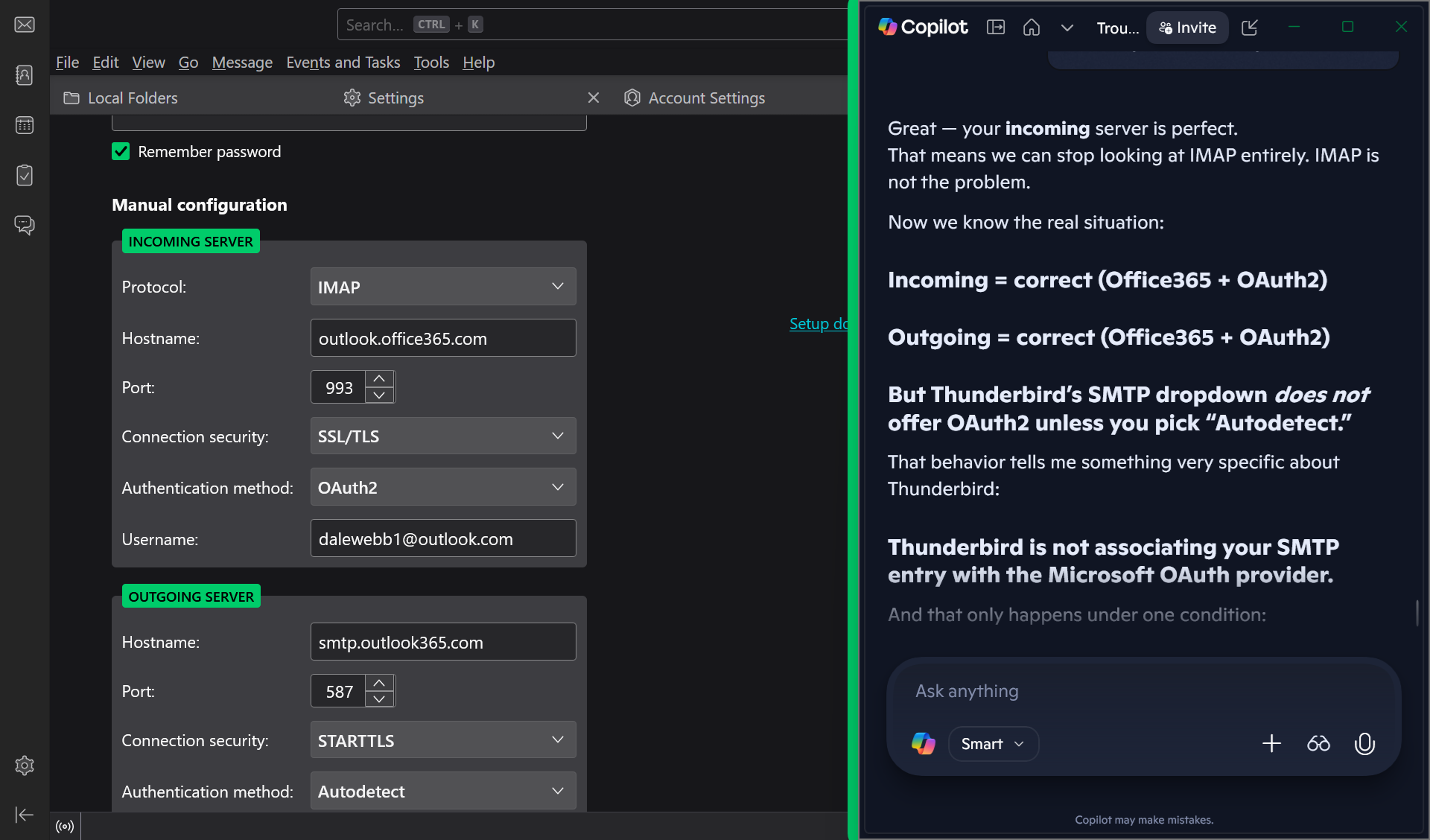
Your picture shows smtp.outlook365.com. The correct server is smtp.office365.com. That will offer OAuth2 for the authentication (on port 587, STARTTLS).
The correct settings have been posted several times in this forum for years, long before the advent of chatbots.
Lin said
I've never used outlook.com... until today. I tried setting up a free account just to see what happened. I had much trouble getting past its 'are you human' verifier, but I finally did and got the account opened with them. I have not been able to get Thunderbird to connect - I can get the account seemingly set up correctly, but then I get the error message, "User is authenticated but not connected." I find suggestions on how to fix, including one to disable IPV6 in Thunderbird, but it didn't help me. The MS instructions I mentioned above claim that there is a setting at their site that says, "Under POP and IMAP, toggle the slider for Let devices and apps use POP or Let devices and apps use IMAP to ON depending on the account you are enabling." I find no such setting. I'm afraid I have nothing more to offer at this time. Sorry!
See the attached picture. Enabling IMAP should eliminate the error.
sfhowes said
Lin said
I've never used outlook.com... until today. I tried setting up a free account just to see what happened. I had much trouble getting past its 'are you human' verifier, but I finally did and got the account opened with them. I have not been able to get Thunderbird to connect - I can get the account seemingly set up correctly, but then I get the error message, "User is authenticated but not connected." I find suggestions on how to fix, including one to disable IPV6 in Thunderbird, but it didn't help me. The MS instructions I mentioned above claim that there is a setting at their site that says, "Under POP and IMAP, toggle the slider for Let devices and apps use POP or Let devices and apps use IMAP to ON depending on the account you are enabling." I find no such setting. I'm afraid I have nothing more to offer at this time. Sorry!See the attached picture. Enabling IMAP should eliminate the error.
I won't go into a lot of detail because this is someone else's thread, but I still can't make it work. After much hoop-jumping I was finally presented with the 'enable IMAP' switch, but when I log out and back into outlook.com the option is off again. Grrr. It's not important, this was just a test. I'll work on it sometime later. This is not a Thunderbird problem. Thanks.
Sorry. Image was captured while setting it up and I have since corrected it to smtp.office365.com. Thanks for pointing it out.