


Mozilla Firefox ESR notification of infection

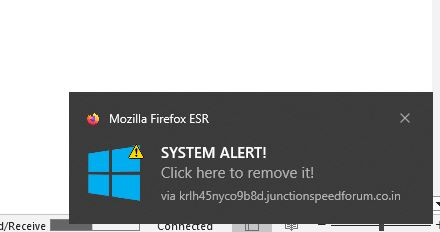
My Windows virus protection shows nothing but I keep getting notices int he lower right corner of my screen that say Mozilla Firefox ESR and tell me there is an infection. It tries to take me to a website to scan and then buy McAfee to fix it. If I make sure Firefox is shut down (forced through Task Manager) it seems to go away. It appears that only the Firefox browser may be infected.

All Replies (2)
Try to block notifications and clear the list of websites that can send them. See https://support.mozilla.org/en-US/kb/push-notifications-firefox#w_how-do-i-stop-firefox-asking-me-to-allow-notifications
You can check if you have a Push permission for suspect domain(s) like shown at the bottom of the message and revoke this permission. See "How do I revoke Web Push permissions for a specific site?":