


Remove a Holiday Calendar from Thunderbird

I added the United States Holiday Calendar to my Thunderbird Calendar.
As it has zilliions more holidays than I care to see (World Pneumonia Day, for example) I would like to remove it. I added it as an internet supplied calendar, not stored on my computer.
Can someone please tell me how to remove it entirely? Also, is there a different, more modest calendar I might add somewhere out there?
Thanks in advance for the assistance. I have searched for a way to do this but have not found anything.
Jeff
Solution eye oponami
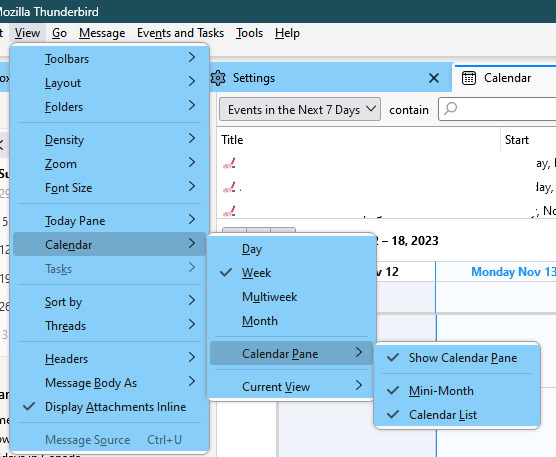
In the Calendar tab, press Alt to show the Menu Bar, then under View/Calendar check that you have the items enabled as in the attached picture.
All Replies (4)
Right-click the calendar in the left pane of the Calendar tab, Unsubscribe Calendar.
Try https://www.thunderbird.net/en-US/calendar/holidays/#U
There are plenty of sites that offer US holiday calendars as ics files.
sfhowes,
Thank you for taking the time to help me with this. I do appreciate it.
A Thunderbird release or two ago, I DO recall seeing calendars listed on the pane you refer to in the Calendar tab, and I did have the ability to toggle seeing it and/or delete it. But when I expand that tab now, I see no calendars listed at all. I have attached a screenshot.
This pane was the first place I went to, thinking I could delete the calendar, but it seems odd to me that it's blank. Perhaps I have a bigger Thunderbird problem than I thought?
What do you think?
Thank you.

Solution eye oponami
In the Calendar tab, press Alt to show the Menu Bar, then under View/Calendar check that you have the items enabled as in the attached picture.
That worked! Thank you!