


Hidden Menu Item when Mouse Hovers on it.

The Menu Item when Mouse Hovers on it goes dark blue making the name unreadable.
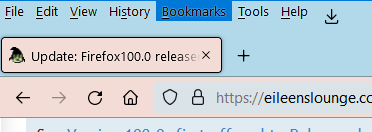

Solution eye oponami
The issue was fixed with yesterday's update, yaaaay!
All Replies (13)
Looks like a problem with the theme you are using that doesn't set the hover text color.
hello cor-el, I have tried over 20 different themes, closing FF then reopening it everytime. The situation is unchanged.
Start Firefox in Troubleshoot Mode to check if one of the extensions ("3-bar" menu button or Tools -> Add-ons -> Extensions) or if hardware acceleration or userChrome.css is causing the problem.
- switch to the DEFAULT theme: "3-bar" menu button or Tools -> Add-ons -> Themes
- do NOT click the "Refresh Firefox" button on the Troubleshoot Mode start window
Hi cor-el, I'm afraid your suggestions do not give clear enough instructions.
I ended up making a userChrome.css change to make the menu background back to a more light-grey. I use https://github.com/aris-t2/customcssforfx for my changes but the bit that affects the menu color is:
  /* Reset menu background to grey instead of dark blue */
  #main-menubar > menu[_moz-menuactive="true"] {
    background-color: rgba(207,207,216,.66) !important;
    color: currentColor !important;
  } /**/
But yeah, I get that dark blue menu color even with a clean profile.
Very clever MarkRH, If it doesn't solve yours, it wont solve mine.
I have the same issue, need a solution to this as it's driving me crazy lol Any chance some settings in about:config could be tweaked to get the color back to light gray as it used to be? As someone posted above, the issue persists with all themes, even a default FF one
There seems to be an easy solution, wait for the next update and use another browser in the meantime. If that fails, wait for the next update.
So there have been two updates since then, and none of them fixed the issue. I'm seriously considering ditching FF for Chrome now, it's an eyesore
I'm not on Windows, so can't check what hover colors are used. You would have to check this with the Browser Toolbox.
Maybe check some CSS rules for _moz-menuactive in the source code:
- https://searchfox.org/mozilla-release/search?q=_moz-menuactive&path=
- https://searchfox.org/mozilla-release/source/toolkit/themes/windows/global/menu.css
- https://searchfox.org/mozilla-release/source/browser/themes/windows/browser-aero.css
I see that in some cases (panels) CSS variables are used by themes:
- https://searchfox.org/mozilla-release/source/browser/themes/shared/customizableui/panelUI-shared.css
- --panel-item-hover-bgcolor
- --panel-item-active-bgcolor
So you can possibly set these variables to another color.
- root {
--panel-item-hover-bgcolor:  #rrggbb !important;
--panel-item-active-bgcolor: #rrggbb !important;
}
If Mozilla are unable to cure the problem, there are other browsers.
George Brown, I don't think they are unable, more like they don't care
Solution eye oponami
The issue was fixed with yesterday's update, yaaaay!