


version 32.0.2 Won't load and top bar appears blurry

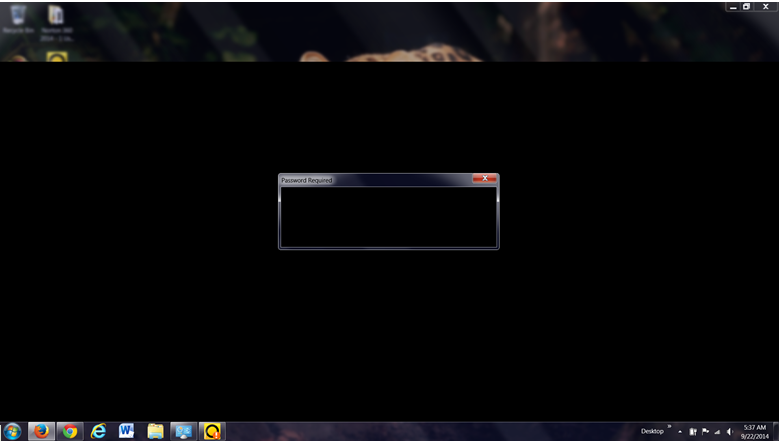
I get a blank page and a blurred bar at top. Unable to click on anything after downloading the new version. (32.0.2)
I am using WIN 7, desktop
Ezalaki modifié na imcathypete
Solution eye oponami
I did the above. Also decided to try changing my theme to the default and that seems to have worked thus far. Thank You for your help.
All Replies (4)
Can you attach a screenshot?
- http://en.wikipedia.org/wiki/Screenshot
- https://support.mozilla.org/kb/how-do-i-create-screenshot-my-problem
- Use a compressed image type like PNG or JPG to save the screenshot
- Make sure that you do not exceed the maximum size of 1 MB
Start Firefox in Safe Mode to check if one of the extensions (Firefox/Tools > Add-ons > Extensions) or if hardware acceleration is causing the problem.
- Switch to the DEFAULT theme: Firefox/Tools > Add-ons > Appearance
- Do NOT click the Reset button on the Safe Mode start window
screenshot
Did you try Safe Mode and possibly disable hardware acceleration in Firefox?
Can you start Firefox in Safe Mode by holding down the Shift/Options key?
- https://support.mozilla.org/kb/Safe+Mode
- https://support.mozilla.org/kb/Troubleshooting+extensions+and+themes
It is possible that your security software (firewall, anti-virus) blocks or restricts Firefox or the plugin-container process without informing you, possibly after detecting changes (update) to the Firefox program.
Remove all rules for Firefox and the plugin-container from the permissions list in the firewall and let your firewall ask again for permission to get full, unrestricted, access to install for Firefox and the plugin-container process and the updater process.
See:
Solution eye oponami
I did the above. Also decided to try changing my theme to the default and that seems to have worked thus far. Thank You for your help.