FOR THE FIFTH TIME - lost audio FF 4.0.1 Windows Ultimate

Where do I find answers? I have reported this problem 4 times before. I have no audio with FF 4.0.1 running on Win 7 Ult. No problem with any other browser nor any other app.
모든 댓글 (5)

Try running Firefox in Use Troubleshoot Mode in Firefox. If it functions properly in that configuration, then one of your add-ons is the culprit.
Thanks, but I had already tried this to no avail
Thanks but I had already read that article and the suggested solutions did not solve the problem.
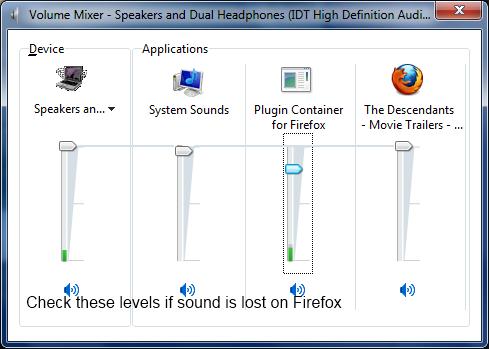
Thanks to those who offered a solution. I finally found the answer and here are the steps to solve the no audio problem.
1- Make sure that QuickTime is up-to-date and working properly 2- Open a URL running audio 3- Open the Volume Mixer (Speaker icon on bottom right corner on screen) 4- Make sure none of the choices are muted and that volume is set at a reasonable level.