


3 Notifications for each email received; constant 'failed to authenticate' error.

Firstly, thank you for providing a simple and clean email client - appreciate the efforts!
I recently switched from K9 Mail to Thunderbird on my Android, seems the two are very similar. When setting up Thunderbird, I chose to use the settings from K9. I have one Gmail account that I use these clients for.
I have two issues: 1) I get 3 Notifications for each email received. It seems to me there is a notification for/from Inbox, All Mail and Important. I have scoured the settings to try and disable or get so these is only one notification per email, but it's not clear to me what or where I should change. I also searched the blogs and do not find a similar issue. All emails go in my inbox, I do not have any rules set up. I don't need the Important filter/separator either, don't use it. This issue is for both K9 and TB.
2) I frequently get an 'authentication failed' notification for the Gmail account. It seems to happen almost every time I switch internet connections - e.g. from wifi to mobile data and vice versa or between different wifi networks. Recently I noticed that the issue seems to sort itself out if I close the app an relaunch. Is this normal? I think it is also for both K9 and TB, I have K9 disabled at the moment and still get the notification, but not clear to me which app it's from.
Would appreciate some guidance to sort this out.
모든 댓글 (4)
Apologies - meant to check whether I should do a separate thread for the second issue and forgot. Will look for feedback from admin/moderator re that and act accordingly.

Hi
1) Gmail allows a single email to have multiple labels assigned to them (All Mail, Inbox, Important). Thunderbird for Android treats the labels as distinct imap folders.
An email with all three labels with appear in all three imap folders (as though duplicated). Thunderbird treats these as independent emails. That's why you see three notifications.
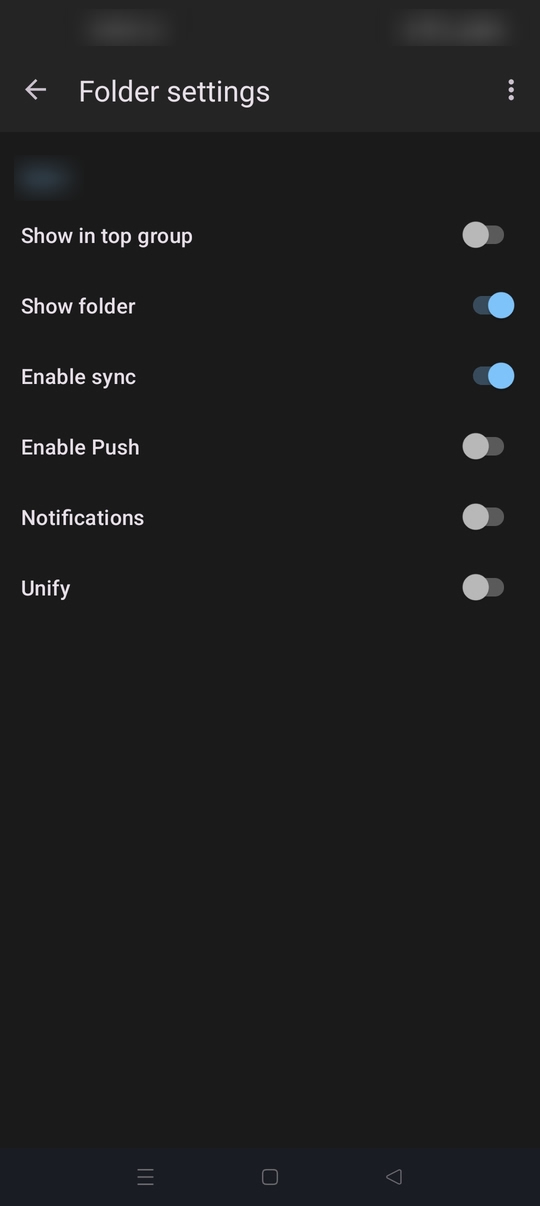
You can enable/disable email notifications based upon the folder they exist within.
- Open the sidebar with your account and its folders showing
- Tap manage folders (bottom of list)
- Tap a folder's name (eg All Mai)
- Toggle Notifications Off/On (per your preference)
See screen shot
To avoid seeing duplicates, disable sync and notifications for "All Mail" and "Important". Emails should normally have at least one other label/imap folder such as Inbox.
2) It's not normal to see authentication errors every time you switch between networks.
You may see it occasionally if you use oAuth 2.0 authentication and the access token the app got from gmail expired and needs renewing.
- Navigate to settings > account name > fetching mail > incoming server
- Click Next
Are you using any VPN or security app on you phone? Is the cellular connection and signal strength in your area good? Are you using the apps push email service for immediate email notifications?
3) K9 and Thunderbird for Android are essentially the same app, bar theme colours. They're build by Thunderbird from the same code base. It's normal for them to look the same.
Thank you kindly, Platform34, for the prompt and detailed reply. Much appreciated!
The Gmail labels make sense, understand now why it's handled like that. Thanks for the guidance to get to Manage Folders and turn sync and notifications off - that solved my first problem. Big relief! Not sure how I managed to miss that part of the settings.....must have fiddled with it before to get it like that but somehow did not think to check it again. Very obvious now.
I'm attaching a screenshot of the error I get when tapping on the 'authentication failed' notification and then testing the incoming server connection. It says the connection failed because of too many simultaneous connections. To answer your questions: I don't use VPN or any other security app; Cellular and wifi connections both fine, I'm on wifi 90% of the time and do not have connectivity problems on any other apps; I have push enabled for inbox, drafts, sent mail, spam, trash and one other folder. Disabled push, sync and notifications for all the others.
Thank you for confirming that Thunderbird and K9 Mail are basically the same app. I have been using K9 since 2017 and Mozilla is my browser of choice on Android and PC. Glad to have come across Thunderbird for Android and happy to switch to it.
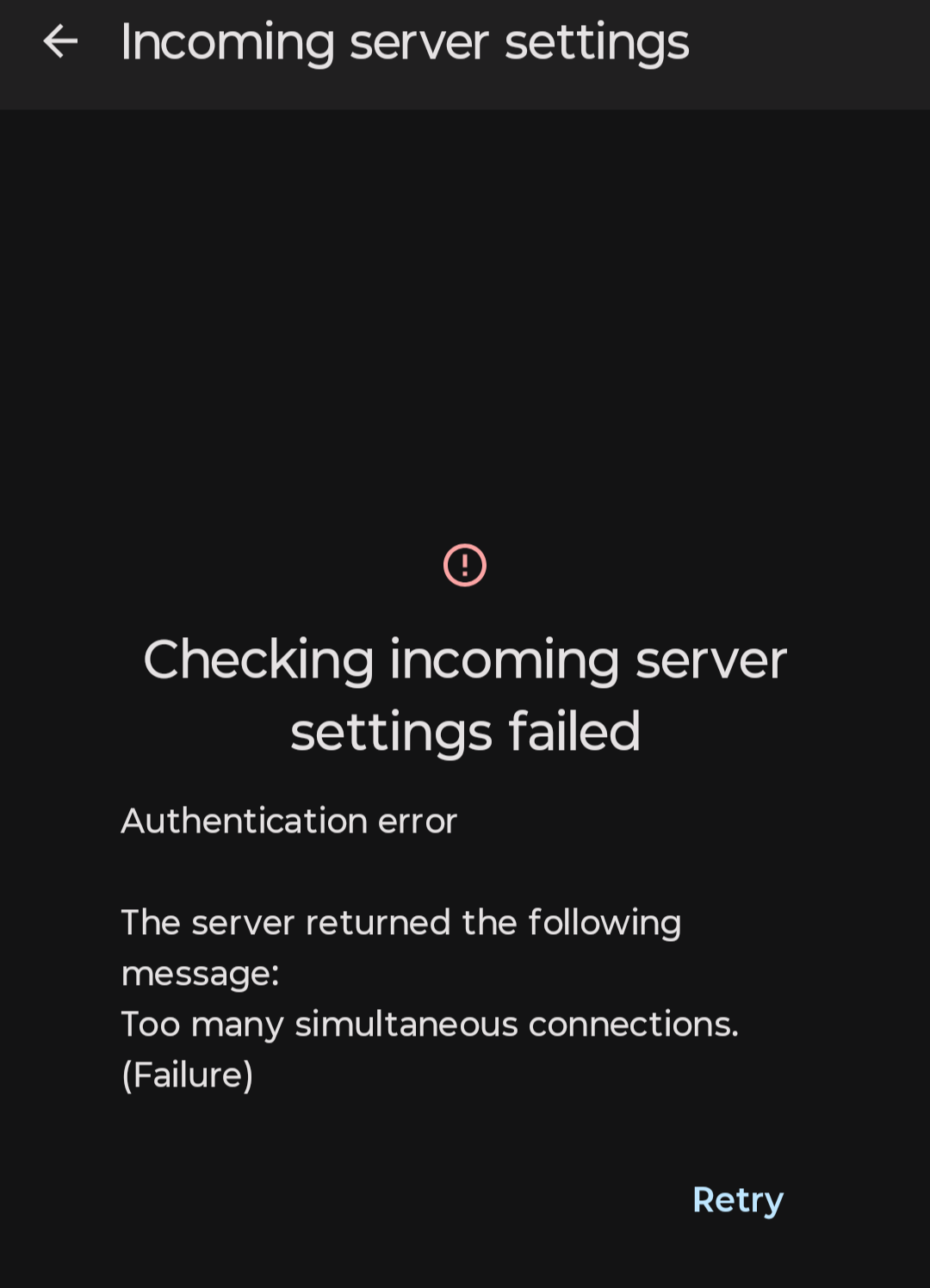
Thanks for posting the screen shot. That clarifies the error.
The issue is not an authentication issue (oAuth or password). The server is rejecting further connections because you're exceeding gmail's limit. Gmail allows a max of 15 simultaneous connections to an account. This is combined across all clients.
Every folder push is enabled on creates and holds an open connection to allow mails to be immediately delivered.
Louw van Wyk said
I have push enabled for inbox, drafts, sent mail, spam, trash and one other folder.
In TB you therefore have 6 simultaneous connections. 7 while the app temporarily connects to poll / sync the other folders.
The question is where are the other connections coming from. Email clients on the same and other devices contribute (tablet, another mobile, desktop PC).
Do you still have K9 Mail installed with push enabled on folders.
To resolve the error, you would need to reduce the number of connections being made.
- Reduce the number of push enabled folders. Use polling (sync) where appropriate.
Do you need immediate delivery of spam, draft and trash emails?
- Review how other clients are configured. Do they also use push?