


On MacOS the calendar does not update to the correct date unless you restart Thunderbird

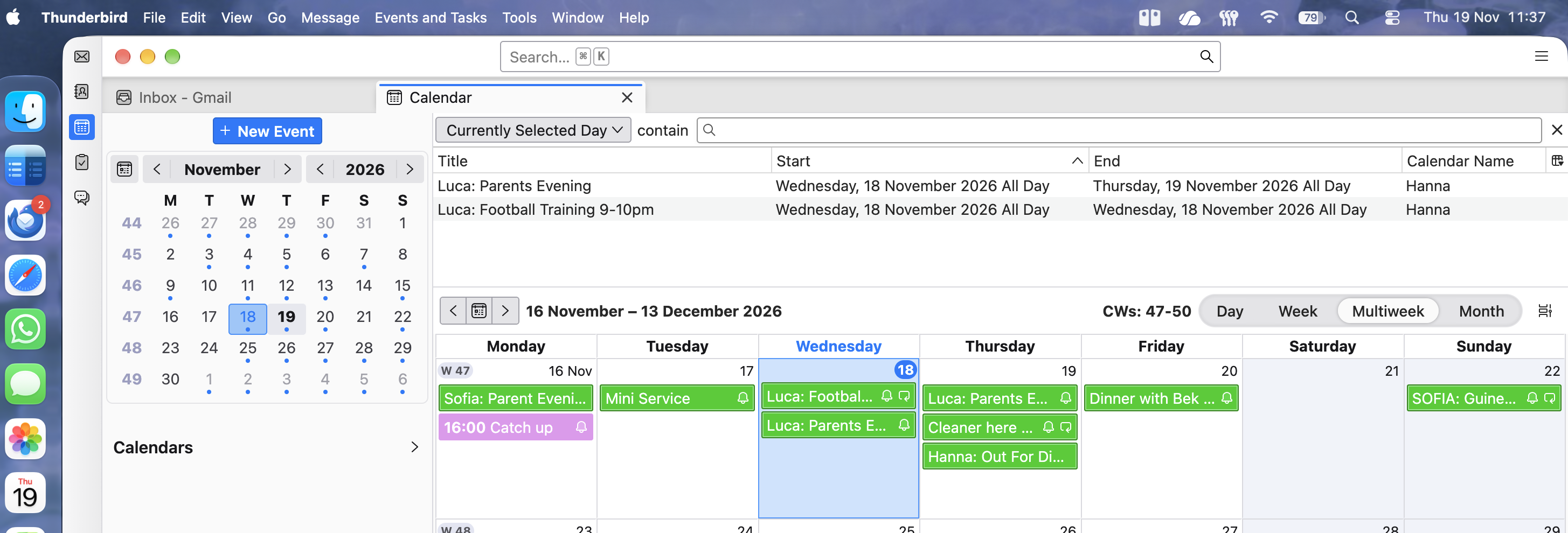
I'm using Thunderbird on a MacBook Air M5 and the calendar does not update the correct date for today, for example today is the 19th but the calendar still has the Blue highlight on the 18th.
Closing and reopening the calendar does not fix it, you need to quit/restart Thunderbird completely. In the attached screen shot it shows the 18th at the moment because I restarted Thunderbird yesterday, if I had last restarted on the 17th then it would still be showing the 17th..
I am currently on Thunderbird 160.0 and MacOS 27.2.1 but this behaviour has been consistent across versions of Thunderbird and MacOS since I started using Thunderbird a couple of months ago.
This is not a massive issue, just an irritation but if there is a setting I can change to make it go away that would be great.
모든 댓글 (2)
Did you verify your time zone in Settings > Calendar ..... ?
Many thanks for the reply.
I did, it is set to Automatic and seems to have detected Europe/London correctly. To see if it makes a difference I have now set it to Manual with the same Europe/London and I'll check tomorrow morning to see if it is now updating correctly.